Typing Ke Liye Sahi Keyboard क्यों है इतना Important?
दोस्तों, मैं अमित कुमार हूँ और आज मैं आपसे एक बहुत ही important topic पर बात करने वाला हूँ - typing के लिए सही keyboard का चुनाव। बहुत से लोग यह सोचते हैं कि keyboard तो बस एक tool है, कोई भी ले लो सब same हैं। लेकिन यकीन मानिए, यह सोच बिल्कुल गलत है। अगर आप seriously typing सीखना चाहते हैं या फिर डेली बेसिस पर बहुत ज्यादा typing करते हैं - चाहे वो data entry job हो, content writing हो, coding हो या government exam की preparation हो - तो सही keyboard आपकी speed, accuracy और comfort तीनों को बहुत ज्यादा affect करता है।
मैंने खुद अपनी typing journey में तीन-चार अलग-अलग keyboards use किए हैं और मुझे पता है कि गलत keyboard से क्या होता है। पहले मैं एक बहुत सस्ता membrane keyboard use करता था। शुरुआत में तो ठीक लगा लेकिन जब मैं रोजाना 4-5 घंटे typing करने लगा तो problems शुरू हो गईं - उंगलियों में दर्द, wrist में strain, और सबसे बड़ी बात कि keys properly respond नहीं कर रही थीं। कभी-कभी एक ही key दो बार type हो जाती थी, कभी press करने पर भी register नहीं होती थी। फिर मैंने research की, अलग-अलग keyboards try किए, और अब मैं आपको वो सारी जानकारी share कर रहा हूँ जो मैंने सीखी है।
Keyboard selection सिर्फ typing speed के बारे में नहीं है। यह आपकी health के बारे में भी है। अगर आप गलत keyboard पर गलत posture में लंबे समय तक type करते हैं तो आपको Repetitive Strain Injury (RSI), Carpal Tunnel Syndrome, और wrist pain जैसी problems हो सकती हैं। ये सब long-term issues हैं जो बाद में बहुत तकलीफ देते हैं। इसलिए शुरू से ही सही keyboard choose करना बहुत जरूरी है। इस detailed guide में मैं आपको सभी types के keyboards के बारे में बताऊंगा, उनके pros और cons discuss करूंगा, और अलग-अलग budgets के according recommendations दूंगा।

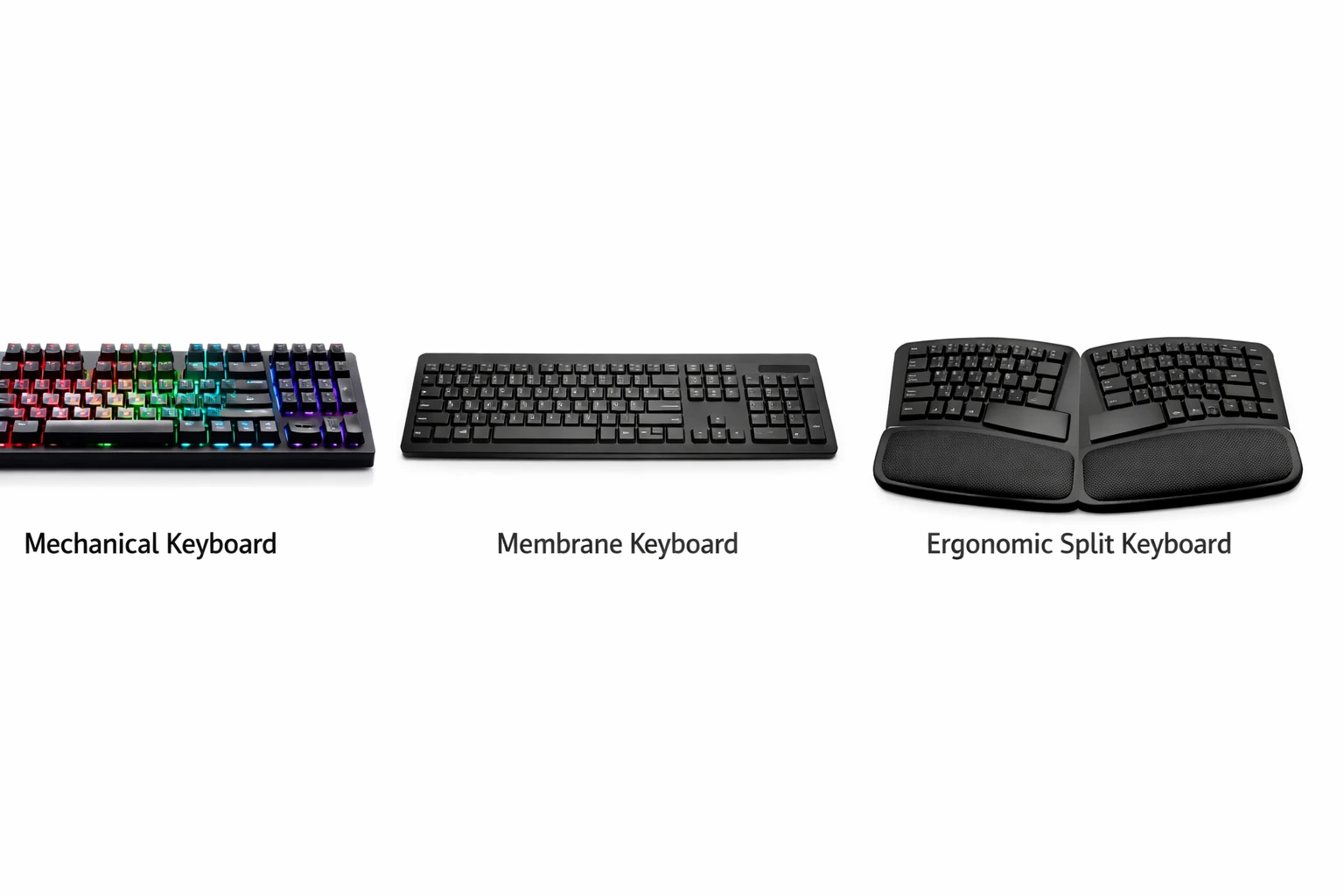
मैकेनिकल, मेम्ब्रेन और एर्गोनॉमिक कीबोर्ड की तुलना - अलग-अलग टाइप्स की विशेषताएं
Keyboard के मुख्य Types और उनकी पूरी जानकारी
Membrane Keyboard - Budget-Friendly Option
Membrane keyboards सबसे common और सबसे affordable keyboards हैं। ज्यादातर offices, cyber cafes, और homes में आपको यही keyboards मिलेंगे। इनकी construction बहुत simple होती है - keys के नीचे एक rubber या silicone membrane होती है जो pressing को detect करती है। जब आप कोई key press करते हैं तो वो membrane नीचे की circuit board को touch करती है और signal generate होता है। यह technology काफी पुरानी है लेकिन आज भी widely used है क्योंकि यह सस्ती और reliable है।
Membrane keyboards के कुछ clear advantages हैं। सबसे बड़ा advantage है price - आप ₹300-500 में भी एक basic membrane keyboard ले सकते हैं। ये बहुत quiet होते हैं क्योंकि membrane sound absorb कर लेती है, तो अगर आप office में काम करते हैं या shared space में रहते हैं तो दूसरों को disturbance नहीं होगी। Weight भी कम होता है तो portable हैं। Spill-resistant designs भी मिलते हैं जो accidental liquid spills को handle कर सकते हैं। Maintenance भी कम है - बस occasional dusting और cleaning काफी है।
लेकिन disadvantages भी हैं जिन्हें ignore नहीं करना चाहिए। Tactile feedback बहुत कम या न के बराबर होता है - आपको पता नहीं चलता कि key properly press हुई या नहीं। इससे typing accuracy affect होती है। Key travel distance inconsistent हो सकता है और कुछ keys दूसरों से ज्यादा hard या soft feel हो सकती हैं। Durability भी limited है - heavy use के साथ keys fade हो जाती हैं, membrane wear out हो जाती है, और 1-2 साल में keyboard replace करना पड़ सकता है। Professional typists के लिए ये ideal नहीं हैं लेकिन beginners या casual users के लिए ठीक हैं।
Mechanical Keyboard - Professional's Choice
अब बात करते हैं mechanical keyboards की जो professionals और enthusiasts की पहली पसंद हैं। Mechanical keyboards में हर key के नीचे एक individual mechanical switch होता है। ये switches बहुत precisely designed होते हैं और consistent performance देते हैं। जब आप key press करते हैं तो switch के अंदर का mechanism activate होता है - एक spring compress होती है और contacts meet करते हैं। यह पूरी process बहुत smooth और predictable होती है। Different types के switches available हैं जैसे Cherry MX, Gateron, Kailh आदि, और हर type की अपनी characteristics होती हैं।
Mechanical keyboards के advantages बहुत सारे हैं। सबसे बड़ा advantage है excellent tactile feedback - आपको exactly पता चलता है कि key press हुई या नहीं। कुछ switches में audible click भी होता है जो satisfying feel देता है। Key actuation बहुत precise और consistent होता है हर key में। Durability exceptional है - अच्छी quality के mechanical switches 50-100 million keystrokes तक चल सकते हैं जो years of heavy use के बराबर है। Typing speed और accuracy दोनों improve होती हैं क्योंकि आपको keys को पूरा नीचे तक press नहीं करना पड़ता - actuation point पहले ही आ जाता है। Customization options भी बहुत हैं - आप keycaps change कर सकते हैं, switches replace कर सकते हैं, और अपनी preference के according setup बना सकते हैं।
लेकिन कुछ disadvantages भी हैं। सबसे बड़ा drawback है price - एक decent mechanical keyboard की शुरुआत ₹2000-3000 से होती है और premium models ₹10,000-15,000 तक जा सकते हैं। Sound level ज्यादा होता है especially clicky switches में, तो shared environments में problem हो सकती है। Weight भी ज्यादा होता है तो portability कम है। Learning curve भी थोड़ा है - अगर आप membrane से switch कर रहे हैं तो शुरुआत में अजीब लग सकता है। लेकिन अगर आप serious typist हैं, professional काम करते हैं, या typing speed improve करना चाहते हैं, तो mechanical keyboard में invest करना worth it है।
Ergonomic Keyboard - Health-Focused Design
Ergonomic keyboards specially designed होते हैं आपकी hand और wrist health को ध्यान में रखकर। Traditional keyboards में आपकी hands एक unnatural position में होती हैं - wrists bent, fingers stretched। Long-term में यह strain और injuries cause कर सकता है। Ergonomic keyboards इस problem को solve करने की कोशिश करते हैं। इनके अलग-अलग designs होते हैं - कुछ में keys split होती हैं दो हिस्सों में, कुछ में wave या curve shape होती है, कुछ में wrist rest built-in होता है, और कुछ तो adjustable tenting भी provide करते हैं जहाँ आप keyboard के angle को customize कर सकते हैं।
Ergonomic keyboards के health benefits बहुत significant हैं। Natural hand position maintain होती है जो wrist strain को reduce करती है। RSI (Repetitive Strain Injury) और Carpal Tunnel Syndrome का risk कम होता है। Long typing sessions के बाद fatigue भी कम होती है। अगर आप पूरे दिन typing करते हैं - जैसे writers, programmers, data entry operators - तो ergonomic keyboard long-term में आपकी health को protect कर सकता है। Comfort level भी बहुत अच्छी होती है एक बार जब आप adjust हो जाते हैं।
Disadvantages की बात करें तो सबसे बड़ी चीज है adaptation period। अगर आप traditional keyboard से आ रहे हैं तो शुरुआत में बहुत अजीब लगेगा और typing speed घट जाएगी। Muscle memory को फिर से develop करना पड़ेगा जो कुछ हफ्ते ले सकता है। Price भी generally high होती है - ₹3000-10,000 range में। Portability कम है क्योंकि ये bulky होते हैं। और सबसे बड़ी problem है कि government exams या offices में आपको standard keyboards ही मिलेंगे, तो अगर आप सिर्फ ergonomic पर practice करते हैं तो actual exam में difficulty हो सकती है। इसलिए ergonomic keyboard home use के लिए अच्छा है लेकिन standard keyboard की practice भी जरूरी है।
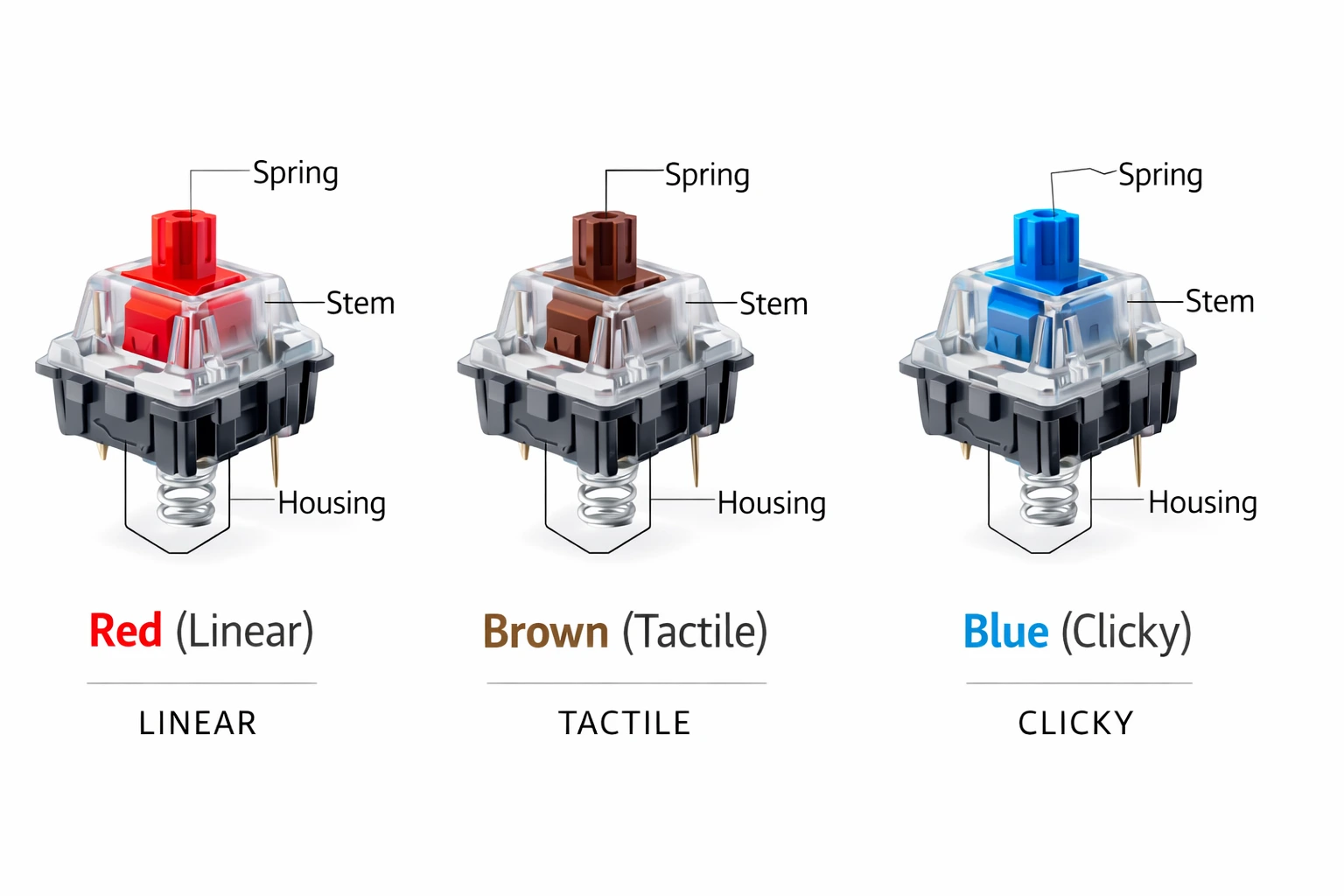
मैकेनिकल कीबोर्ड स्विचेज के विभिन्न प्रकार - लिनियर, टैक्टाइल और क्लिकी
Mechanical Switches की Detail में समझ
Linear Switches - Smooth और Silent
Linear switches में कोई tactile bump या audible click नहीं होता। Key press करने पर movement बिल्कुल smooth होता है top से bottom तक। Popular examples हैं Cherry MX Red, Black, और Speed Silver। ये gaming के लिए preferred होते हैं क्योंकि fast repeated keystrokes easy होते हैं। Typing के लिए भी अच्छे हैं अगर आपको quiet operation चाहिए। लेकिन tactile feedback न होने से कुछ लोगों को लगता है कि control कम है और accuracy affect होती है। Reds light होते हैं (45g actuation force), Blacks heavy (60g), और Speed Silvers बहुत light और fast (45g but shorter travel)।
Tactile Switches - Best of Both Worlds
Tactile switches में एक noticeable bump होता है actuation point पर लेकिन loud click sound नहीं होता। यह bump आपको feedback देता है कि key registered हो गई लेकिन disturbing sound नहीं करता। Cherry MX Brown सबसे popular tactile switch है और मैं personally typing के लिए इसे recommend करता हूँ। ये balanced हैं - न बहुत light न बहुत heavy (55g actuation force), clear feedback देते हैं, और relatively quiet हैं। Office environments के लिए perfect हैं। Touch typing सीखने वालों के लिए भी अच्छे हैं क्योंकि tactile feedback से confidence बढ़ता है।
Clicky Switches - Maximum Feedback
Clicky switches में tactile bump के साथ-साथ loud, satisfying click sound भी होता है। Cherry MX Blue और Green इस category में आते हैं। ये typing enthusiasts के बीच बहुत popular हैं क्योंकि feedback maximum होता है - आप feel और hear दोनों कर सकते हैं कि key press हुई। Typing accuracy बहुत अच्छी होती है। लेकिन sound level बहुत high है जो shared spaces में problem बन सकता है। Blues light हैं (60g) और Greens heavy (80g)। अगर आप घर पर अकेले काम करते हैं और loud typing का sound आपको पसंद है तो ये excellent choice हैं।
Government Exams के लिए Keyboard Selection
Exam Centers में क्या होता है?
अगर आप SSC CGL, SSC CHSL, या किसी अन्य government typing exam की तैयारी कर रहे हैं तो यह जानना बहुत जरूरी है कि actual exam में आपको किस तरह का keyboard मिलेगा। ज्यादातर exam centers में basic membrane keyboards होते हैं - usually Dell, HP, या Lenovo के standard models। ये high-end नहीं होते, बस functional होते हैं। Keys का feel अलग-अलग हो सकता है क्योंकि keyboards पुराने हो सकते हैं या wear and tear से affected हो सकते हैं। कभी-कभी कुछ keys sticky या unresponsive भी हो सकती हैं।
इसलिए मेरी strong recommendation है कि आप अपनी practice भी एक standard membrane keyboard पर करें, भले ही आपके पास घर पर fancy mechanical keyboard हो। अगर आप सिर्फ mechanical पर practice करेंगे तो exam day पर membrane keyboard बहुत अलग feel होगा और आपकी speed और accuracy affect हो सकती है। Best approach है कि आप दोनों तरह के keyboards पर practice करें - mechanical अपनी daily practice के लिए (क्योंकि ये comfortable हैं और health के लिए अच्छे हैं), और membrane weekly या bi-weekly mock tests के लिए ताकि आप exam condition से familiar रहें।
Practice Setup Recommendations
Ideal setup यह होगा कि आपके पास दो keyboards हों - एक अच्छा mechanical या ergonomic जिस पर आप अपनी daily 2-3 घंटे की practice करें, और एक basic membrane जैसा exam centers में होता है। Membrane keyboard पर हफ्ते में कम से कम 2-3 बार practice करें, especially mock tests। इससे आपको दोनों keyboards के साथ comfort level बना रहेगा। multityping.in पर mock tests देते समय deliberately membrane keyboard use करें ताकि exam जैसा environment बने।
अगर budget constraint है तो सिर्फ एक अच्छा membrane keyboard खरीदें और उसी पर practice करें। ₹800-1500 range में Logitech K120, Dell KB216, या HP K1500 जैसे reliable options मिल जाते हैं। ये durable हैं, comfortable हैं, और exam keyboards के similar हैं। बाद में जब आप job में आ जाएं तो mechanical में upgrade कर सकते हैं। Remember - exam में सफलता keyboard से नहीं बल्कि आपकी skill और practice से आती है। Expensive keyboard होना जरूरी नहीं है, सही keyboard होना जरूरी है।
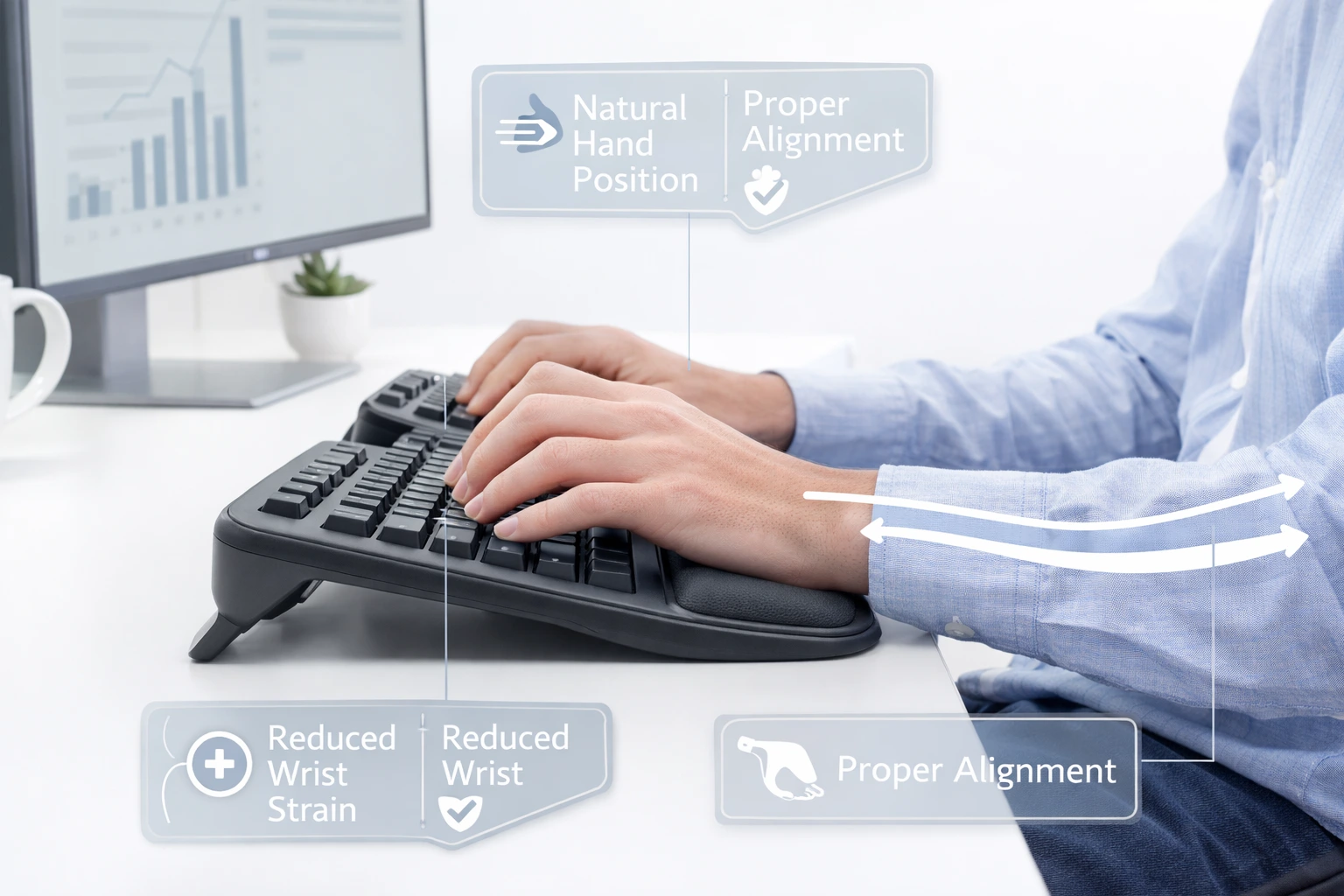
एर्गोनॉमिक कीबोर्ड - सही हैंड पोजिशनिंग और रिस्ट सपोर्ट के साथ
Budget-Wise Keyboard Recommendations
Under ₹1000 - Entry Level
अगर आपका budget बहुत tight है तो भी कुछ decent options available हैं। Logitech K120 (₹400-500) एक classic choice है - simple, durable, और reliable। Keys अच्छी हैं, layout standard है। Dell KB216 (₹500-600) भी अच्छा option है office use के लिए। TVS Gold Bharat (₹800-900) Indian brand है और decent quality है। Zebronics keyboards भी इस range में मिलते हैं लेकिन quality थोड़ी variable है। इस budget में आपको premium features नहीं मिलेंगे लेकिन basic typing के लिए काफी हैं। Spill-resistant models भी मिलते हैं जो accidental liquid damage से protect करते हैं।
₹1000-3000 - Mid Range
यह range बहुत interesting है क्योंकि यहाँ आपको कुछ premium membrane keyboards और budget mechanical keyboards दोनों मिलते हैं। Logitech K480 (₹2500) एक multi-device keyboard है जो Bluetooth के through तीन devices से connect हो सकता है - laptop, tablet, phone। HP Pavilion Wireless Keyboard 600 (₹1500) wireless option है अगर आप wires से बचना चाहते हैं। Mechanical side में Cosmic Byte CB-GK-13 (₹2000-2500) entry-level mechanical है Blue switches के साथ - clicky और loud लेकिन budget में mechanical experience। Zebronics Max Plus (₹1800) भी decent budget mechanical है। इस range में थोड़ा research करके smart choice ले सकते हैं।
₹3000-7000 - Premium Range
अब हम serious territory में आ गए हैं। Logitech MX Keys (₹6000-7000) एक premium wireless keyboard है excellent typing experience के साथ। Keys perfectly sculpted हैं, backlighting है, और multi-device connectivity है। Corsair K55 RGB (₹4000) gaming keyboard है लेकिन typing के लिए भी अच्छा है। Keychron K2 (₹5000-6000) बहुत popular mechanical keyboard है compact design और hot-swappable switches के साथ। HyperX Alloy Core RGB (₹3500) membrane gaming keyboard है अच्छी build quality के साथ। Ant Esports MK1200 (₹3000) budget mechanical है decent switches और RGB के साथ। इस range में quality बहुत अच्छी मिलती है।
₹7000+ - Enthusiast Level
अगर आप serious हैं और best चाहते हैं तो इस range में invest करें। Logitech MX Mechanical (₹12,000-15,000) wireless mechanical है low-profile switches के साथ। Keychron Q Series (₹10,000+) premium custom mechanical keyboards हैं full aluminum body और hot-swap sockets के साथ। Ducky One 2 (₹8,000-12,000) enthusiast-favorite है excellent build quality के साथ। Leopold FC660M (₹12,000+) premium PBT keycaps और Cherry MX switches के साथ आता है। HHKB Professional (₹20,000+) ultimate typing keyboard है Topre switches के साथ। यह range professionals, writers, और coding करने वालों के लिए है जो keyboard पर पूरा दिन बिताते हैं। Hindi typing के लिए भी ये keyboards excellent हैं।
Keyboard Maintenance और Care Tips
Regular Cleaning
Keyboard को लंबे समय तक अच्छी condition में रखने के लिए regular cleaning बहुत जरूरी है। Dust, dirt, food particles, और अन्य debris keys के बीच में जमा हो जाते हैं जो performance को affect करते हैं। Weekly एक बार keyboard को upside down करके shake करें ताकि loose particles निकल जाएं। Compressed air can use करें keys के बीच की जगह clean करने के लिए। Microfiber cloth से surface को wipe करें। Monthly एक बार keycaps निकालकर thorough cleaning करें - warm soapy water में keycaps धो सकते हैं (membrane boards में सावधानी से) और keyboard base को isopropyl alcohol से clean करें।
Proper Usage Habits
कुछ habits develop करें जो keyboard की life बढ़ा सकती हैं। Keyboard के पास खाना-पीना avoid करें - spills सबसे common damage cause हैं। Keys को जोर से न मारें - gentle press काफी है। Hands धोने के बाद keyboard use करें ताकि oil और dirt transfer न हो। Dust cover use करें जब keyboard use में न हो। Proper posture maintain करें ताकि unnecessary pressure न पड़े। Mechanical keyboards में switches को over-press न करें - actuation point के बाद रुक जाएं। ये छोटी-छोटी बातें keyboard को years तक healthy रख सकती हैं।
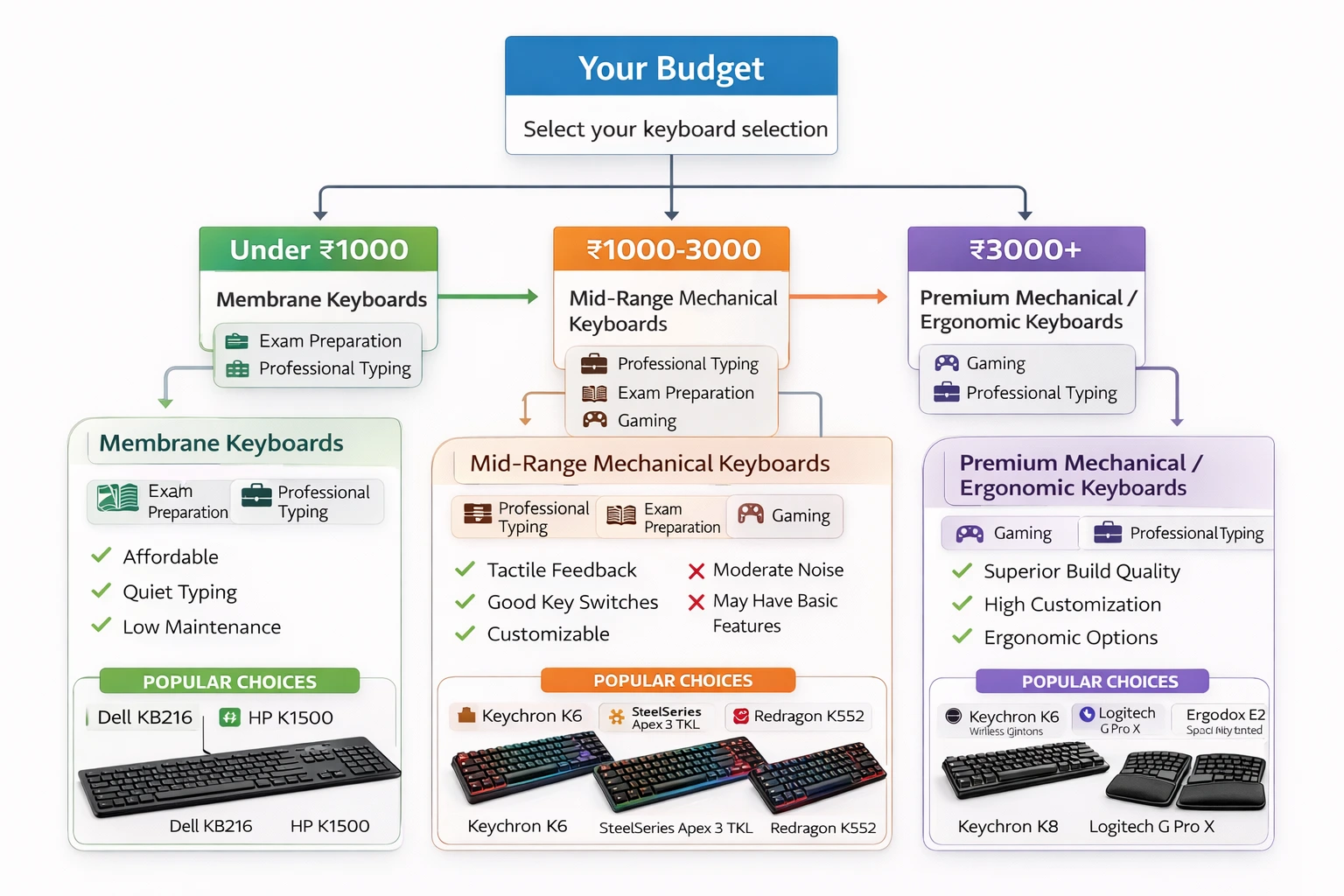
बजट और उपयोग के आधार पर कीबोर्ड खरीदने की निर्णय चार्ट गाइड
Frequently Asked Questions (FAQs)
Typing के लिए सबसे अच्छा keyboard कौन सा है?
यह आपकी requirements पर depend करता है। Professional typists के लिए mechanical keyboard with Brown switches ideal है क्योंकि ये tactile feedback देते हैं बिना ज्यादा noise के। Government exam aspirants के लिए standard membrane keyboard recommended है क्योंकि exam centers में वही मिलता है। Long hours काम करने वालों के लिए ergonomic keyboard health benefits provide करता है। Budget constraint में Logitech K120 या Dell KB216 जैसे reliable membrane keyboards अच्छे options हैं।
Mechanical और membrane keyboard में क्या difference है?
Mechanical keyboards में हर key के नीचे individual mechanical switch होता है जो precise, consistent, और durable होता है। ये excellent tactile feedback देते हैं और 50-100 million keystrokes तक चलते हैं। Membrane keyboards में keys के नीचे rubber/silicone membrane होती है जो cheaper और quieter है लेकिन tactile feedback कम है और durability भी कम (usually 5-10 million keystrokes)। Mechanical keyboards महंगे हैं (₹2000+) जबकि membrane सस्ते (₹300+)।
Cherry MX Brown switches क्यों recommend किए जाते हैं typing के लिए?
Cherry MX Brown switches tactile category में आते हैं - इनमें noticeable bump होता है actuation point पर जो feedback देता है, लेकिन loud click sound नहीं होता। ये balanced हैं - न बहुत light (55g actuation force) न heavy। Typing accuracy improve होती है क्योंकि आपको पता चलता है कि key registered हुई। साथ ही relatively quiet हैं तो office environments के लिए suitable हैं। Typing speed बढ़ाने में भी ये मदद करते हैं।
क्या wireless keyboard typing के लिए अच्छा है?
Modern wireless keyboards (especially Bluetooth 5.0+) में latency बहुत कम है और typing experience wired keyboards जितना ही अच्छा है। Logitech MX Keys, Keychron K2 जैसे premium wireless keyboards professional typing के लिए excellent हैं। Advantages हैं - no cable clutter, portability, multi-device connectivity। Disadvantages - battery charging की जरूरत, थोड़ा महंगे। Casual typing और office work के लिए wireless perfectly fine है। Gaming या critical timing work के लिए wired still preferred है।
Ergonomic keyboard में कितना समय लगता है adjust होने में?
Ergonomic keyboard पर adjust होने में usually 1-2 हफ्ते लगते हैं। शुरुआत में आपकी typing speed 30-40% तक गिर सकती है क्योंकि layout और positioning अलग होती है। Muscle memory को re-train करना पड़ता है। पहले हफ्ते में daily 1-2 घंटे practice करें, ज्यादा नहीं। धीरे-धीरे समय बढ़ाएं। 2-3 हफ्ते में आपकी speed normal हो जाएगी। Long-term health benefits को देखते हुए यह adjustment period worth it है especially अगर आप daily 6-8 घंटे typing करते हैं।
Budget keyboard में कौन से features जरूरी हैं?
Budget keyboard खरीदते समय कुछ essential features check करें: (1) Standard layout - सभी keys proper position में हों। (2) Decent key travel - keys को press करने पर proper feedback मिले। (3) Build quality - keyboard हिलना नहीं चाहिए, sturdy होना चाहिए। (4) Spill-resistant design अगर possible हो। (5) Wired connection अगर reliability चाहिए। (6) Brand warranty - कम से कम 6 months। Logitech, Dell, HP जैसे established brands prefer करें। Backlighting, media keys जैसे fancy features skip कर सकते हैं budget में।
Laptop keyboard vs external keyboard - कौन सा बेहतर है?
External keyboard typing के लिए बेहतर है। Laptop keyboards में key travel कम होता है, tactile feedback minimal है, और ergonomics भी proper नहीं होती। Long typing sessions में laptop keyboard use करने से wrist strain और shoulder pain हो सकता है। External keyboard के साथ आप proper posture maintain कर सकते हैं - laptop को eye level पर रखें (stand use करके) और external keyboard comfortable height पर। यह setup neck और back pain भी prevent करता है। Touch typing सीखने के लिए भी external keyboard recommended है।
Gaming keyboard और typing keyboard में क्या difference है?
Gaming keyboards में focus होता है fast response time, anti-ghosting (multiple simultaneous key presses), RGB lighting, और programmable keys पर। ये usually linear switches (Red, Silver) use करते हैं जो fast repeated keystrokes के लिए optimized हैं। Typing keyboards में tactile switches (Brown) preferred हैं जो feedback देते हैं और accuracy improve करते हैं। Build quality और keycap material भी different हो सकते हैं। हालांकि, अच्छे gaming keyboards typing के लिए भी काफी अच्छे होते हैं। Corsair K70, HyperX Alloy FPS जैसे keyboards both purposes serve कर सकते हैं।
Keyboard को कितने समय तक चलना चाहिए?
यह keyboard type पर depend करता है। Budget membrane keyboards (₹500-1000) usually 1-2 साल चलते हैं normal use में। Good quality membrane keyboards (₹1500-3000) 3-5 साल तक चल सकते हैं। Mechanical keyboards की life बहुत लंबी होती है - high-quality switches 50-100 million keystrokes rated होते हैं जो daily 8 hours typing के साथ 10-20 साल तक चल सकते हैं। इसलिए mechanical keyboards में higher initial investment long-term में worth it होता है। Proper maintenance और care से keyboard की life और बढ़ सकती है।
Online vs offline keyboard कहाँ से खरीदें?
Dono options के अपne pros और cons हैं। Online (Amazon, Flipkart) - ज्यादा variety, competitive prices, reviews dekh sakte hain, easy returns। लेकिन actual feel test नहीं कर सकते। Offline (computer shops, brand stores) - keyboard physically test कर सकते हैं, immediate purchase, personal assistance। लेकिन limited variety और sometimes higher prices। Best approach: पहले offline जाकर different keyboards try करें, decide करें कौन सा pasand है, फिर online best price check करें। Mechanical keyboards के लिए offline testing recommend करता हूं क्योंकि switch preference personal होती है। multityping.in पर practice करके अपनी requirements clear करें पहले।
Conclusion - अपना Perfect Keyboard चुनें
दोस्तों, keyboard selection एक personal choice है जो आपकी specific needs, budget, और usage patterns पर depend करती है। कोई एक 'perfect' keyboard नहीं है जो सभी के लिए best हो। अगर आप government exam की तैयारी कर रहे हैं तो एक reliable membrane keyboard (₹800-1500) से शुरू करें जो exam environment के similar हो। Professional typists, writers, और programmers को mechanical keyboard (₹3000+) में invest करना चाहिए - preferably Brown switches के साथ। अगर आप पूरे दिन typing करते हैं और health को priority देते हैं तो ergonomic keyboard (₹4000+) consider करें।
Budget constraints में भी compromise मत करिए quality के साथ। एक decent ₹1000-1500 का keyboard खरीदना बेहतर है ₹500 के सस्ते से जो 6 महीने में खराब हो जाए। Remember - keyboard एक long-term investment है। आप इस पर हर दिन घंटों काम करने वाले हैं, तो comfort और durability important हैं। Reviews पढ़ें, possible हो तो offline stores में जाकर actual keyboards test करें, अपनी requirements clear रखें।
आज ही multityping.in पर जाइये और typing practice शुरू करिये। याद रखें - सबसे महंगा keyboard भी आपकी typing automatically improve नहीं कर देगा। Skills develop करने के लिए regular practice जरूरी है। सही keyboard आपको comfortable और efficient बनाएगा, लेकिन mastery तो practice से ही आएगी। Hindi typing, touch typing, और speed improvement - सब कुछ consistent practice से possible है। Happy typing! ⌨️💪