Bengali Typing Test Typing Test
Official Exam Simulation & Weak Diagnostic Drill
Online Bengali Typing Test
2026 — Free Practice
Prepare for West Bengal & Tripura government exams (WBPSC, WB Police, Tripura PSC) with real exam-like Bengali typing practice. Master the Bengali InScript keyboard layout and hit 30 WPM — Backspace disabled, just like the actual exam.
⌨️ Start Bengali Typing TestBengali Typing Test 2026 — Everything You Need to Know
If you're preparing for a government job in West Bengal or Tripura, there's one skill you absolutely cannot skip — Bengali typing. Whether it's WBPSC, WB Police, or Tripura PSC, almost every clerical and data entry post requires you to clear a Bengali typing test before the final appointment.
But here's what most candidates don't realise early enough: this test isn't just about typing fast. It's about typing accurately, without corrections, in a real-time timed environment where the Backspace key is completely disabled. That changes everything about how you should practise.
This page gives you a proper, no-fluff guide to the Bengali typing test — what the exam expects, how the keyboard layout works, and the most effective way to reach 30 WPM so you don't leave that job to someone else.
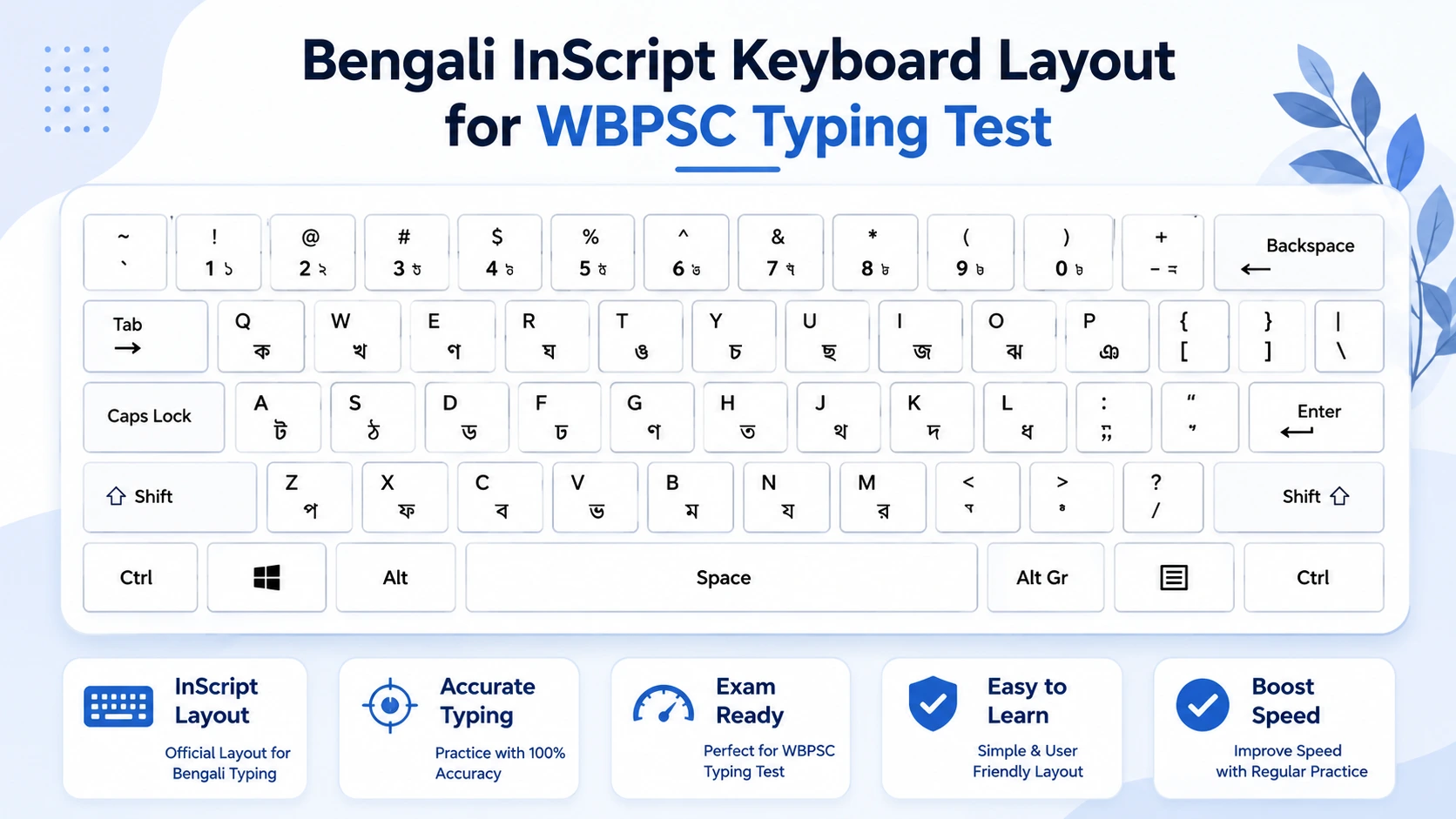
Bengali InScript keyboard layout — the standard for all West Bengal & Tripura government typing exams.
What is the Bengali InScript Keyboard Layout?
The Bengali InScript layout is a Unicode-based standardised keyboard layout developed for Indian languages. It's the government-approved layout for Bengali typing in all West Bengal and Tripura state exams, and it's what you'll find on the computer during your actual test.
Unlike older font-based systems, InScript is completely Unicode — which means what you type is portable, searchable, and works correctly across all modern operating systems. If you've used Hindi InScript before, you'll notice structural similarities, but Bengali has its own distinct character set, vowel signs (matras), and consonant combinations (yuktakshar) that take time to memorise.
Key things to know about Bengali InScript:
The basic consonants (ব্যঞ্জনবর্ণ) are mapped primarily to the middle and top rows of the keyboard. Vowels and vowel marks (স্বরবর্ণ) are on the left side. Special characters and conjuncts require two-key combinations using the Hasanta key. The more you practise, the more these key positions become muscle memory — and that's exactly the goal.
Bengali Typing Exam Speed Requirements 2026
Official speed benchmarks for West Bengal & Tripura government typing exams.
| Exam / Post | Bengali Speed | English Speed | Duration | Backspace |
|---|---|---|---|---|
| WBPSC (Clerical / DEO) | 30 WPM (Net) | 30 WPM (Net) | 10 Min | Disabled |
| WB Police (Constable / Clerk) | 30 WPM (Net) | 30 WPM (Net) | 10 Min | Disabled |
| Tripura PSC | 30 WPM (Net) | 30 WPM (Net) | 10 Min | Disabled |
* Always verify exact requirements from official recruitment notifications before your exam.
Why "Backspace Disabled" Changes Your Entire Practice Strategy
Most people practise typing with Backspace freely available. They type, they correct, they move on — and their speed looks decent. But in the actual exam, Backspace is disabled. Every error you make stays on screen and gets counted against your net WPM score.
Net WPM = Gross WPM − Error Penalty. So if you're typing at 40 WPM gross but making 8 mistakes, your net speed could drop to 30 WPM or even below. Candidates who've never practised without Backspace often freeze up or panic in the real exam — not because they're slow, but because they're suddenly hyper-aware of every key press.
This is exactly why Multi Typing's Bengali typing test runs with Backspace disabled by default in exam mode. The discomfort you feel in the first week of practising this way is exactly the discomfort your competition isn't dealing with — and that's your advantage.
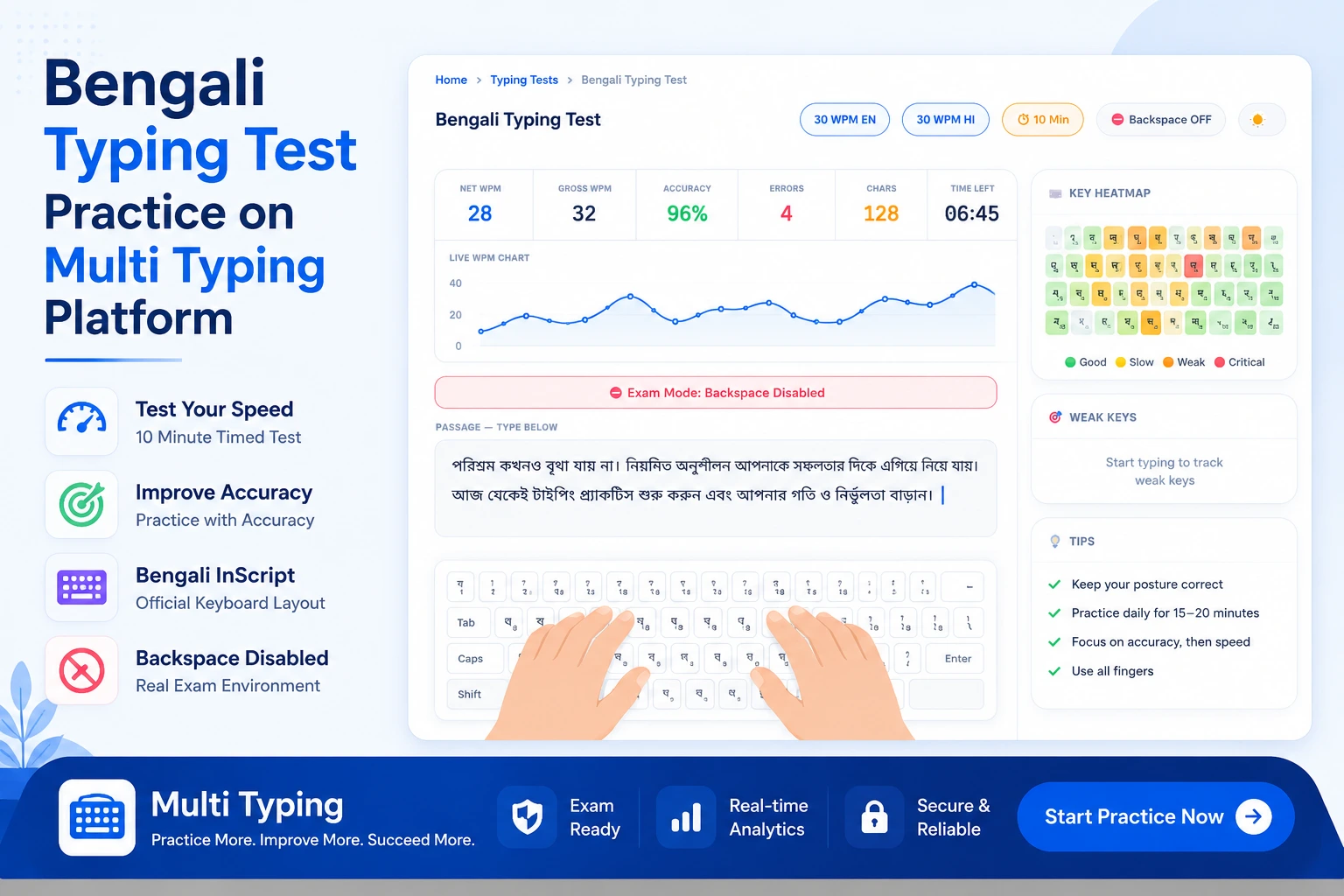
Bengali typing test in action on Multi Typing — real-time WPM tracking, error marking, and key heatmap to identify your weak fingers.
How to Reach 30 WPM Bengali Typing in 8 Weeks
Eight weeks is a realistic, achievable timeline — if you practise smartly. Here's a rough framework that works for most Bengali typing beginners:
Week 1–2: Learn the Layout, Don't Race
Spend the first two weeks only on learning key positions. Type slowly. Focus on where each Bengali character lives on the keyboard. Use our 1-minute and 3-minute test modes to avoid fatigue. Speed doesn't matter yet — position accuracy does.
Week 3–4: Build Flow, Switch Off Backspace
By week 3, start using Backspace Disabled mode exclusively. You'll feel uncomfortable — that's fine. Your brain is rewiring itself to commit before pressing. Start doing 5-minute sessions twice a day.
Week 5–6: Full 10-Minute Sessions Daily
This is where stamina kicks in. Bengali typing requires consistent finger positioning for 10 full minutes. Practise at least one full 10-minute test every day. Review your key heatmap after each session and focus on your three weakest keys.
Week 7–8: Speed Drilling and Consistency
By now your accuracy should be stable. This phase is about pushing from 25 to 30+ WPM through repetition. Use our Weak Keys Only focus mode to target the specific characters slowing you down. Aim for 3 sessions per day in the final week before your exam.
Bengali Typing Test — Frequently Asked Questions
Honest answers to questions candidates ask most before their typing exam.
Which keyboard layout is used for Bengali typing in government exams?
How long does it take to learn Bengali typing from scratch?
What is the difference between Bengali typing and Hindi typing?
Is Bengali typing compulsory for WBPSC exams?
Can I practise Bengali and English typing together on Multi Typing?
What does "Net WPM" mean and how is it calculated?
Start Your Bengali Typing Practice Today
বাংলা টাইপিং টেস্ট — Free online practice with real exam conditions. No signup needed.