Government Exam Typing Test
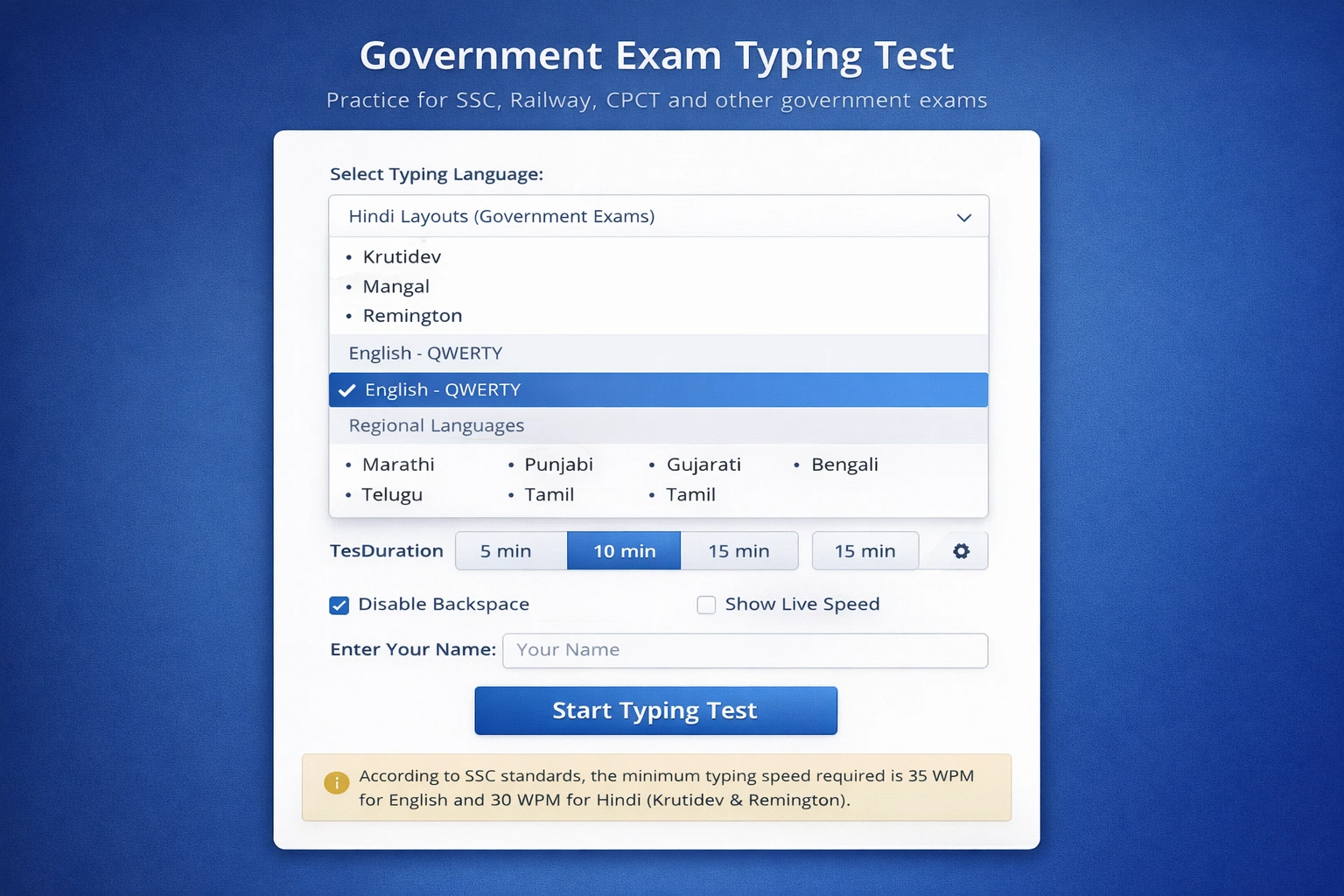
Practice for SSC, Railway, High Court, CPCT with exam-like conditions
SSC Standard: English 35 WPM, Hindi 30 WPM (10 min)
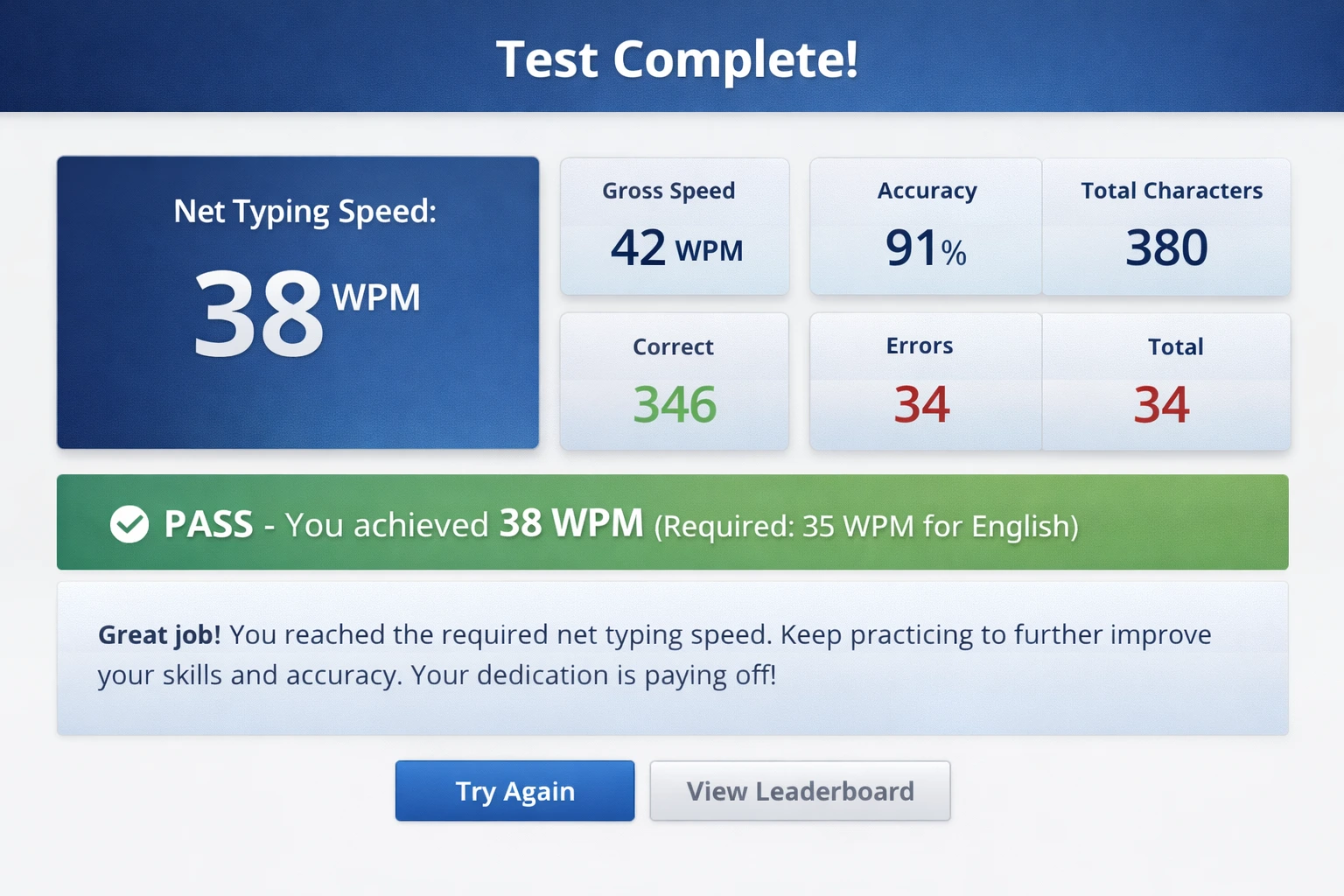
Calculation: Net Speed = (Total Characters / 5) - Errors
🚀 MultiTyping.in - भारत का सबसे बेहतरीन ऑनलाइन टाइपिंग टेस्ट प्लेटफॉर्म
क्या आप अपनी टाइपिंग स्पीड बढ़ाना चाहते हैं? क्या आप सरकारी नौकरी के लिए टाइपिंग टेस्ट की तैयारी कर रहे हैं? या फिर आप अपने कंप्यूटर स्किल्स को improve करना चाहते हैं? MultiTyping.in आपके लिए perfect solution है! हमारा प्लेटफॉर्म आपको फ्री ऑनलाइन टाइपिंग प्रैक्टिस का अवसर प्रदान करता है जहाँ आप अपनी typing speed और accuracy को professional level तक ले जा सकते हैं।
अभी शुरू करें अपनी टाइपिंग जर्नी!
बिल्कुल फ्री में टाइपिंग स्पीड टेस्ट दें और अपनी प्रगति को ट्रैक करें
टाइपिंग टेस्ट शुरू करें → सभी टूल्स देखें →📊 MultiTyping.in क्या है और यह आपके लिए क्यों जरूरी है?
MultiTyping.in एक comprehensive ऑनलाइन टाइपिंग टेस्ट प्लेटफॉर्म है जो विशेष रूप से भारतीय users के लिए डिज़ाइन किया गया है। आज के डिजिटल युग में, fast और accurate typing एक essential skill बन गई है - चाहे आप student हों, professional हों, या job seeker हों। हमारा प्लेटफॉर्म आपको न सिर्फ टाइपिंग स्पीड टेस्ट देने की सुविधा देता है, बल्कि आपकी typing skills को systematically improve करने में भी मदद करता है।
🎯 हमारे प्लेटफॉर्म की विशेषताएं
✅ बिल्कुल मुफ्त
कोई hidden charges नहीं, कोई subscription fees नहीं। पूरी तरह से free typing practice और tests।
⚡ रियल-टाइम स्पीड ट्रैकिंग
आपकी WPM (Words Per Minute) और accuracy को live track करें और instantly results देखें।
📱 मोबाइल फ्रेंडली
किसी भी device से practice करें - computer, laptop, tablet या smartphone।
🏆 प्रोग्रेस ट्रैकिंग
अपनी improvement को देखें और अपने पिछले scores के साथ compare करें।
🔤 Multiple Languages
Hindi और English दोनों languages में typing practice की सुविधा।
⏱️ Customizable Tests
अपनी जरूरत के हिसाब से test duration और difficulty level choose करें।
हमारा MultiTyping.in platform specially designed है उन लोगों के लिए जो अपनी कीबोर्ड टाइपिंग स्किल्स को professional level पर ले जाना चाहते हैं। चाहे आप SSC, Railway, Banking या किसी भी सरकारी परीक्षा की तैयारी कर रहे हों, हमारे typing speed test tools आपकी सफलता में महत्वपूर्ण भूमिका निभा सकते हैं।
💡 टाइपिंग स्पीड क्यों महत्वपूर्ण है?
आज के डिजिटल युग में, फास्ट टाइपिंग स्पीड सिर्फ एक skill नहीं, बल्कि एक necessity बन गई है। आइए समझते हैं कि good typing speed क्यों इतनी important है:
🎓 शिक्षा में टाइपिंग का महत्व
Students के लिए fast typing बहुत फायदेमंद है। Online classes, assignments, research work और exams में अच्छी typing speed होने से आप ज्यादा समय बचा सकते हैं और बेहतर परिणाम प्राप्त कर सकते हैं। जब आप जल्दी type कर सकते हैं, तो आप अपने thoughts को बेहतर तरीके से express कर पाते हैं और अपने content पर ज्यादा focus कर सकते हैं।
💼 करियर में टाइपिंग स्पीड के फायदे
Professional world में टाइपिंग स्पीड एक valuable asset है। Data entry operators, content writers, programmers, customer support executives - सभी को fast और accurate typing की जरूरत होती है। कई companies hiring के दौरान minimum typing speed requirement रखती हैं। Good typing speed होने से आप:
- Productivity बढ़ा सकते हैं: कम समय में ज्यादा काम complete कर सकते हैं
- Better job opportunities: High-paying positions के लिए eligible बन सकते हैं
- Professional image: Colleagues और clients के सामने confident दिख सकते हैं
- Multitasking ability: बिना keyboard देखे typing करके दूसरे tasks पर focus कर सकते हैं
- Career advancement: Promotions और salary increments के बेहतर chances
🏛️ सरकारी नौकरी में टाइपिंग टेस्ट
भारत में अधिकतर सरकारी नौकरियों में typing test mandatory होता है। SSC CHSL, SSC CGL, Railway Clerk, Court Clerk, Stenographer जैसी परीक्षाओं में specific typing speed requirements होती हैं:
📋 सरकारी परीक्षाओं के लिए टाइपिंग स्पीड आवश्यकताएं
| परीक्षा/पोस्ट | English Speed (WPM) | Hindi Speed (WPM) | Accuracy |
|---|---|---|---|
| SSC CHSL (DEO) | 35 WPM | 30 WPM | Min 95% |
| SSC CGL (Tax Assistant) | 40 WPM | 35 WPM | Min 96% |
| Railway Clerk | 30 WPM | 25 WPM | Min 95% |
| Court Clerk | 35-40 WPM | 30-35 WPM | Min 95% |
| Stenographer | 100+ WPM (Shorthand) | 80+ WPM (Shorthand) | Min 97% |
इन requirements को पूरा करने के लिए regular practice जरूरी है। हमारे typing test tool पर daily practice करके आप आसानी से इन targets को achieve कर सकते हैं।
🛠️ MultiTyping.in के टूल्स और फीचर्स
हमारे tools page पर आपको विभिन्न प्रकार के typing tools मिलेंगे जो आपकी हर जरूरत को पूरा करते हैं:
⌨️ 1. Online Typing Speed Test
यह हमारा सबसे popular tool है जो आपको accurate typing speed measurement provide करता है। इस tool में:
- Real-time WPM calculation: जैसे-जैसे आप type करते हैं, आपकी speed live update होती रहती है
- Accuracy percentage: हर keystroke को track करके accuracy calculate करता है
- Error highlighting: गलत typed words को highlight करता है ताकि आप अपनी mistakes identify कर सकें
- Time tracking: Multiple time options - 1 minute, 2 minutes, 5 minutes, 10 minutes
- Instant results: Test complete होते ही detailed results और performance analysis
📝 2. Typing Practice Module
Practice makes perfect! हमारा typing practice tool आपको structured practice sessions प्रदान करता है:
- Beginner level lessons: Keyboard layout सीखने से लेकर basic finger positioning तक
- Intermediate exercises: Common words और phrases की practice
- Advanced drills: Complex sentences, paragraphs और technical content
- Custom text practice: अपना खुद का text upload करके practice करें
- Touch typing exercises: Bina keyboard देखे type करना सीखें
📈 3. Progress Tracking Dashboard
अपनी improvement को monitor करना बहुत important है। हमारा dashboard आपको detailed insights देता है:
- Performance graphs: Daily, weekly, monthly progress visualization
- Speed trends: आपकी typing speed कैसे बढ़ रही है
- Accuracy analysis: Common mistakes और improvement areas
- Best scores: आपके personal records और achievements
- Comparison charts: अपनी current performance को past performance से compare करें
🎯 4. Specialized Typing Tests
विभिन्न exam patterns के अनुसार specific tests:
- SSC Typing Test: SSC pattern के according exact test format
- Railway Typing Test: Railway exam specifications के अनुसार
- Court Typing Test: Judiciary exams के लिए specialized tests
- 10-Minute Test: Long duration tests के लिए stamina building
- Professional Typing Test: Corporate requirements के हिसाब से
🌐 5. Multilingual Typing Support
भारत एक multilingual देश है, इसलिए हम provide करते हैं:
- Hindi Typing: Devanagari script में complete typing support
- English Typing: Professional English typing practice
- Bilingual Tests: Hindi और English दोनों में proficiency develop करें
- Transliteration Support: Easy Hindi typing के लिए Roman script option
🎓 अपने टाइपिंग स्किल्स को Next Level पर ले जाएं
हमारे comprehensive tools का उपयोग करके professional typist बनें
सभी टूल्स एक्सप्लोर करें →🎓 टाइपिंग स्पीड कैसे बढ़ाएं - Complete Guide
अच्छी typing speed develop करना एक journey है। यहाँ हम आपको step-by-step guide दे रहे हैं कि कैसे आप अपनी typing को improve कर सकते हैं:
1️⃣ सही Posture और Position
Good typing की foundation सही posture से शुरू होती है:
- Sitting position: सीधे बैठें, back को support दें, feet flat on floor
- Screen distance: Monitor को eye level पर रखें, लगभग 20-26 inches की दूरी पर
- Keyboard placement: Keyboard को comfortable height पर रखें, wrists को neutral position में
- Hand position: Fingers को home row keys (ASDF JKL;) पर रखें
- Lighting: Adequate lighting सुनिश्चित करें to reduce eye strain
2️⃣ Touch Typing Master करें
Touch typing वह technique है जहाँ आप बिना keyboard देखे type करते हैं। यह सबसे important skill है:
- Home row learning: सबसे पहले home row keys को अच्छे से सीखें
- Finger assignment: हर finger की specific keys याद करें - left pinky के लिए Q, A, Z; left ring finger के लिए W, S, X आदि
- Muscle memory: Daily practice से muscle memory develop होती है
- Don't peek: Keyboard देखने का temptation resist करें, भले ही शुरुआत में slow हो
- Use online tools: MultiTyping.in के practice modules specifically touch typing के लिए designed हैं
3️⃣ Regular और Consistent Practice
Consistency key है typing speed improve करने में:
- Daily sessions: कम से कम 30 minutes daily practice करें
- Multiple sessions: एक long session से बेहतर है 3-4 short sessions throughout the day
- Gradual progression: धीरे-धीरे difficulty level बढ़ाएं
- Varied content: Different types के text practice करें - simple words, sentences, paragraphs
- Timed practice: Regular timed tests लें अपनी progress track करने के लिए
- Morning: 15 minutes warm-up exercises (basic drills)
- Afternoon: 20 minutes focused practice (specific weaknesses)
- Evening: 15 minutes speed test और accuracy check
4️⃣ Accuracy को Priority दें
Speed से पहले accuracy पर focus करें:
- Slow and steady: शुरुआत में speed की चिंता न करें, accurate typing पर focus करें
- Error correction: जब errors कम हो जाएं, तब naturally speed बढ़ेगी
- Common mistakes: अपनी frequent mistakes identify करें और उन पर काम करें
- 95%+ accuracy target: कम से कम 95% accuracy maintain करते हुए speed बढ़ाएं
- Quality over quantity: 60 WPM with 98% accuracy, 80 WPM with 85% accuracy से बेहतर है
5️⃣ Advanced Techniques और Tips
जब आप basics master कर लें, तो ये advanced techniques try करें:
🔤 Common Word Patterns
Frequently used words और letter combinations की practice करें। English में "the", "and", "that", "with" जैसे common words हैं जो repeatedly आते हैं। इन्हें quickly type करने की practice करें।
⚡ Speed Bursts
Short bursts में maximum speed से type करने की practice करें। 15-20 seconds के लिए जितनी fast हो सके type करें, फिर normal speed पर आएं। यह technique आपकी maximum typing capability को बढ़ाती है।
🎯 Targeted Weakness Training
अपनी weaknesses identify करें - specific letters, letter combinations, या types of words जो आपको slow करते हैं। इन पर focused practice करें।
📚 Real-world Content Practice
Books, articles, या अपने field के technical documents से content लेकर practice करें। यह real-world typing scenarios के लिए आपको prepare करता है।
🧘 Breaks और Rest
Regular breaks लें to avoid fatigue और repetitive strain injury (RSI). हर 20-30 minutes में 2-3 minutes का break लें। Finger और wrist stretches करें।
📊 Typing Speed Improvement Timeline
Average progress जो आप expect कर सकते हैं consistent practice से:
- Week 1-2: Basic finger positioning और home row mastery (10-15 WPM)
- Week 3-4: All keys comfortable होना (20-25 WPM)
- Month 2: Without looking typing करना (30-35 WPM)
- Month 3: Good speed development (40-50 WPM)
- Month 4-6: Professional level speed (60-70 WPM)
- 6+ Months: Expert level (80+ WPM) with high accuracy
Note: यह average timeline है। आपकी progress आपकी daily practice time और dedication पर depend करती है।
🏆 MultiTyping.in का उपयोग कैसे करें - Step by Step
हमारे platform को use करना बहुत आसान है। यहाँ complete guide है:
Step 1: Website पर जाएं
MultiTyping.in को अपने browser में open करें। Website सभी modern browsers (Chrome, Firefox, Safari, Edge) में perfectly काम करती है और mobile-friendly भी है।
Step 2: Test Select करें
Test page पर जाकर अपनी पसंद का test select करें:
- Language choose करें (Hindi या English)
- Test duration select करें (1, 2, 5, या 10 minutes)
- Difficulty level choose करें (Beginner, Intermediate, Advanced)
- Test type select करें (Speed test, Practice mode, या Exam pattern)
Step 3: Test शुरू करें
"Start Test" button पर click करें। Screen पर text appear होगा जिसे आपको type करना है। जैसे ही आप typing शुरू करेंगे, timer automatically start हो जाएगा।
- अपनी fingers को home row position पर रखें
- Screen को comfortable distance पर adjust करें
- Deep breath लें और relax रहें
- Accuracy पर focus करें, speed automatically आएगी
Step 4: Focus करके Type करें
Test के दौरान ध्यान रखें:
- Screen पर दिए text को ध्यान से पढ़ें और exactly वैसा ही type करें
- Real-time feedback: आपकी current WPM और accuracy screen पर दिखती रहेगी
- Error indication: गलत typed characters red में highlight होंगे
- Progress bar: आपको पता रहेगा कितना test बाकी है
- Stay calm: Mistakes होने पर panic न करें, simply correct करें और continue करें
Step 5: Results देखें और Analyze करें
Test complete होने के बाद आपको detailed results मिलेंगे:
- Final WPM Score: आपकी average typing speed
- Accuracy Percentage: कितने प्रतिशत correct typing की
- Total Words Typed: कुल कितने words type किए
- Error Count: कितनी गलतियां हुईं
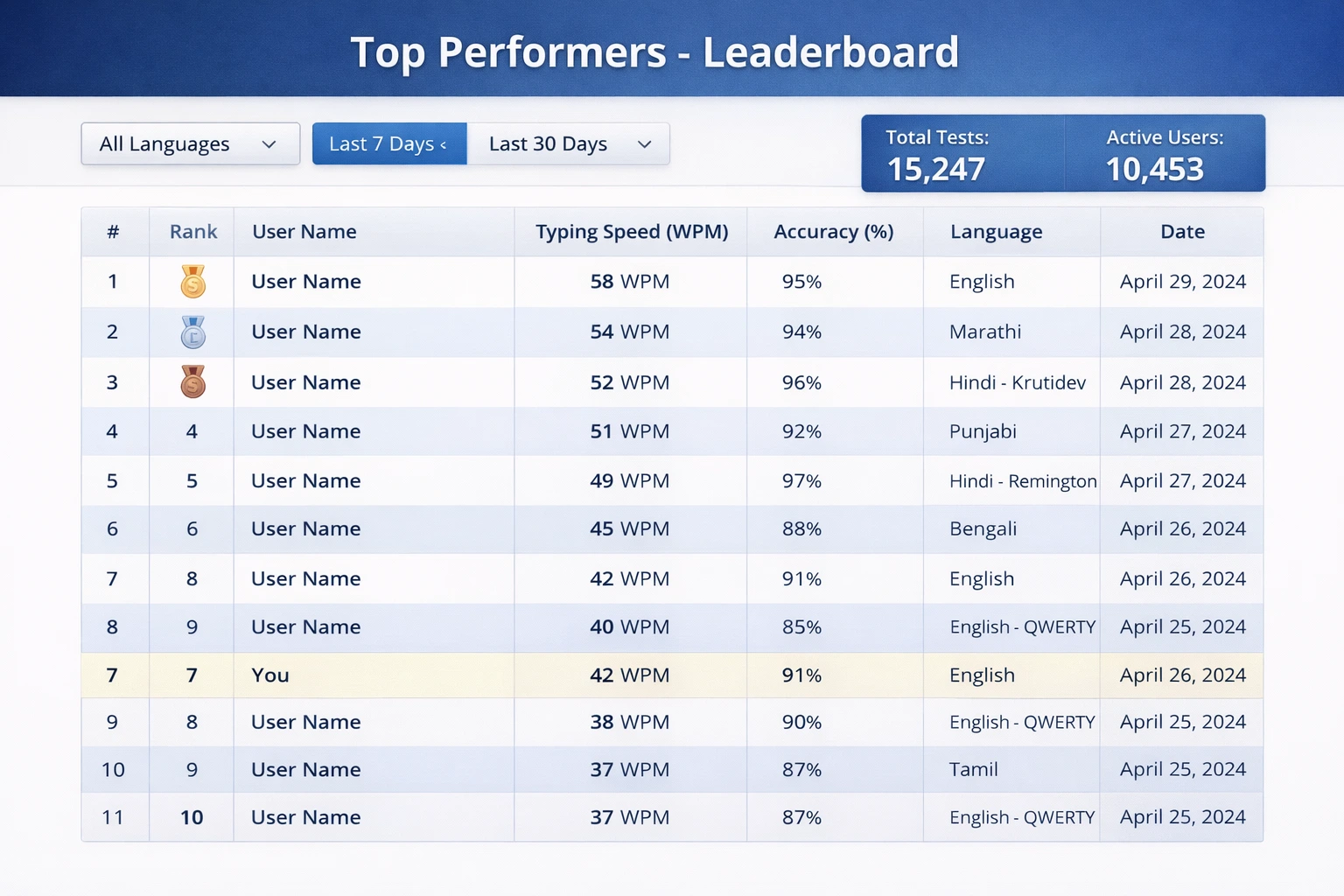
- Performance Graph: Test के दौरान speed variations
- Comparison Chart: Previous attempts के साथ comparison
- Improvement Suggestions: कहाँ improve करना है
Step 6: Practice और Improve
Results analysis के बाद:
- अपनी mistakes को note करें
- Practice tools का उपयोग करके specific areas पर काम करें
- Daily practice routine set करें
- Regular tests लेकर progress track करें
- Personal goals set करें और उन्हें achieve करने की कोशिश करें
🎯 अभी Practice शुरू करें!
हर दिन सिर्फ 15-20 minutes practice करके अपनी typing speed को double करें
टाइपिंग टेस्ट लें → Practice Tools देखें →❓ अक्सर पूछे जाने वाले सवाल (FAQs)
Answer: आम तौर पर, 40-50 WPM एक average typing speed मानी जाती है। Professional work के लिए 60-70 WPM ideal है। सरकारी नौकरियों में अलग-अलग requirements होती हैं - SSC के लिए 35-40 WPM, data entry के लिए 50+ WPM। Accuracy हमेशा 95% से ऊपर होनी चाहिए। हमारे platform पर regular practice करके आप आसानी से ये targets achieve कर सकते हैं।
Answer: जी हां! MultiTyping.in पूरी तरह से mobile-responsive है। आप अपने smartphone, tablet, laptop या desktop किसी भी device से typing test दे सकते हैं। हालांकि, serious practice और exam preparation के लिए physical keyboard के साथ practice करना recommended है क्योंकि actual exams में physical keyboard ही use होती है।
Answer: यह आपकी current speed, daily practice time और dedication पर depend करता है। Generally, अगर आप daily 30-45 minutes consistent practice करें तो:
- पहले महीने में 10-15 WPM improvement
- 2-3 महीने में 20-30 WPM improvement
- 6 महीने की dedicated practice से 40-50 WPM improvement possible है
MultiTyping.in के structured practice modules का regular use करके आप faster results देख सकते हैं।
Answer: जी हां, बिल्कुल! MultiTyping.in पूरी तरह से free typing test platform है। कोई hidden charges नहीं, कोई subscription fees नहीं। सभी features - typing tests, practice modules, progress tracking, multilingual support - सब कुछ absolutely free है। हमारा mission है typing skills को सभी के लिए accessible बनाना।
Answer: Touch typing एक method है जिसमें आप keyboard देखे बिना type करते हैं, सिर्फ muscle memory के basis पर। यह important है क्योंकि:
- Speed increase: बिना देखे type करने से speed काफी बढ़ जाती है
- Better accuracy: Systematic finger placement से errors कम होते हैं
- Productivity: Screen पर focus रह सकता है, keyboard देखने की जरूरत नहीं
- Professional skill: Most professional jobs में touch typing expected है
- Health benefits: Better posture, less neck strain
हमारे practice tools specifically touch typing सिखाने के लिए designed हैं।
Answer: SSC typing test preparation के लिए follow करें ये steps:
- Target को जानें: SSC CHSL के लिए English में 35 WPM या Hindi में 30 WPM, accuracy minimum 95%
- Daily practice: कम से कम 1 घंटा dedicated practice
- Exam pattern: 10-minute test format में practice करें
- Both languages: English और Hindi दोनों में comfortable रहें
- Mock tests: Regular mock tests लें exam जैसे environment में
- Accuracy first: Speed से पहले accuracy पर focus करें
MultiTyping.in पर SSC-specific test patterns available हैं जो actual exam को simulate करते हैं।
Answer: Hindi typing सीखने के लिए:
- Keyboard layout: पहले Devanagari keyboard layout से familiar हों
- Remington या Inscript: अपनी जरूरत के अनुसार layout choose करें
- Character positioning: मात्राओं और व्यंजनों की position याद करें
- Practice regularly: Daily Hindi content type करके practice करें
- Start slow: Accuracy पर focus करते हुए धीरे-धीरे speed बढ़ाएं
हमारा platform Hindi typing के लिए comprehensive support provide करता है।
Answer: नहीं, आप किसी भी standard keyboard से typing practice कर सकते हैं। हालांकि, कुछ बातें ध्यान रखें:
- Comfortable keyboard: Keys responsive होनी चाहिए
- Proper size: Full-size keyboard recommended है serious practice के लिए
- Ergonomic design: Long practice sessions के लिए ergonomic keyboard helpful हो सकता है
- Mechanical vs Membrane: अपनी preference के according choose करें
- Clean और maintain: Keyboard को clean रखें for better performance
Answer: Hand या wrist pain serious issue हो सकता है। निम्नलिखित precautions लें:
- Correct posture: हमेशा सही posture maintain करें
- Regular breaks: हर 20-30 minutes में 5 minutes का break लें
- Stretching exercises: Hand, wrist और finger stretches करें
- Ergonomic setup: Keyboard और chair की height proper हो
- Wrist support: Wrist rest या ergonomic mouse pad use करें
- Medical advice: अगर pain persist करे तो doctor से consult करें
Answer: हां, लेकिन कुछ बातों का ध्यान रखें:
- Proper lighting: Adequate lighting होनी चाहिए, eye strain avoid करने के लिए
- Blue light filter: Night mode या blue light filter use करें
- Limited duration: बहुत late night तक practice न करें, sleep important है
- Comfortable environment: Quiet और comfortable place choose करें
Actually, MultiTyping.in 24/7 available है, तो आप अपनी convenience के अनुसार कभी भी practice कर सकते हैं!
🎯 विभिन्न Professions के लिए Typing Requirements
Different professions में अलग-अलग typing speed requirements होती हैं। आइए देखें कि किस field में कितनी typing speed जरूरी है:
💼 Data Entry Operator
Required Speed: 40-60 WPM | Accuracy: 98%+
Data entry professionals को fast और extremely accurate होना पड़ता है। वे daily हजारों entries process करते हैं। Numeric keypad proficiency भी बहुत important है। Regular typing tests लेकर आप इस level की speed develop कर सकते हैं।
✍️ Content Writer / Blogger
Required Speed: 50-70 WPM | Accuracy: 95%+
Content writers को अपने thoughts को quickly type करने की ability होनी चाहिए। Good typing speed creative flow को maintain करने में help करती है। Fast typing होने से writers अपने ideas को बेहतर capture कर पाते हैं।
👨💻 Software Developer / Programmer
Required Speed: 60-80 WPM | Accuracy: 99%+
Programmers को not only fast बल्कि extremely accurate भी होना पड़ता है। Code में एक भी typo costly error बन सकता है। Special characters, brackets, और symbols की typing में proficiency essential है।
📞 Customer Support Executive
Required Speed: 40-50 WPM | Accuracy: 96%+
Customer support में real-time communication होता है। Fast typing होने से response time improve होता है और customers को better service मिलती है। Chat support में तो typing speed directly customer satisfaction को impact करती है।
📊 Administrative Assistant / Secretary
Required Speed: 50-65 WPM | Accuracy: 97%+
Administrative professionals को documents, emails, reports तैयार करने होते हैं। Good typing speed से वे efficiently multiple tasks handle कर सकते हैं। Professional correspondence में accuracy बहुत important है।
📰 Journalist / Reporter
Required Speed: 60-80 WPM | Accuracy: 95%+
Journalists को often tight deadlines में काम करना पड़ता है। Fast typing होने से वे quickly stories file कर सकते हैं। Breaking news coverage में speed crucial होती है।
🏥 Medical Transcriptionist
Required Speed: 70-90 WPM | Accuracy: 98%+
Medical transcription एक specialized field है जहाँ excellent typing skills के साथ medical terminology की knowledge भी चाहिए। High accuracy essential है क्योंकि medical records में errors serious consequences हो सकते हैं।
⚖️ Legal Typist / Court Reporter
Required Speed: 60-100 WPM | Accuracy: 99%+
Legal professionals को extremely high accuracy के साथ fast typing करनी पड़ती है। Court proceedings को verbatim record करना होता है। Stenography skills के साथ typing proficiency जरूरी है।
🔧 Common Typing Mistakes और उनसे कैसे बचें
Typing में सबसे common mistakes और उनके solutions:
❌ Mistake #1: Keyboard देखकर Typing करना
Problem: यह सबसे बड़ी mistake है जो typing speed को seriously limit करती है।
Solution:
- Touch typing technique सीखें और practice करें
- Deliberately screen पर focus रखें, keyboard पर नहीं
- Keyboard cover या blank keyboard use करें initially
- शुरुआत में slow होने पर भी keyboard न देखें
- Online practice tools use करें जो touch typing सिखाते हैं
❌ Mistake #2: गलत Finger Positioning
Problem: सभी fingers use न करना या wrong fingers से keys press करना।
Solution:
- Home row position (ASDF JKL;) हमेशा maintain करें
- हर finger की designated keys याद करें
- Systematic finger movement practice करें
- छोटी उंगली (pinky) को भी properly use करें
- Thumb को space bar के लिए use करें
❌ Mistake #3: Speed पर ज्यादा Focus, Accuracy को Ignore करना
Problem: बहुत fast type करने की कोशिश में बहुत सारी errors होना।
Solution:
- पहले accuracy perfect करें, speed naturally आएगी
- 95%+ accuracy target रखें
- Errors को immediately correct करने की बजाय, उनसे सीखें
- Slow but accurate typing से शुरू करें
- Regular accuracy checks करें MultiTyping.in पर
❌ Mistake #4: Inconsistent Practice
Problem: Irregular practice से improvement slow होती है।
Solution:
- Daily practice routine set करें, चाहे 15-20 minutes ही हो
- Consistent timing रखें practice के लिए
- Progress track करें to stay motivated
- Skip न करें, even on busy days short session लें
- Weekly goals set करें और achieve करें
❌ Mistake #5: Bad Posture और Ergonomics
Problem: गलत posture से pain, fatigue और slow typing।
Solution:
- Proper sitting position maintain करें
- Keyboard और screen को correct height पर रखें
- Wrists को neutral position में रखें
- Regular stretches और breaks लें
- Ergonomic furniture invest करें if possible
❌ Mistake #6: Specific Keys या Combinations से Struggle करना
Problem: कुछ specific letters, numbers या special characters में difficulty।
Solution:
- अपनी weak areas identify करें
- उन specific keys पर focused practice करें
- Difficult combinations को repeatedly practice करें
- Custom practice texts create करें जिनमें वो characters ज्यादा हों
- Specialized practice modules use करें
❌ Mistake #7: Backspace का ज्यादा Use
Problem: हर छोटी mistake पर backspace press करके time waste करना।
Solution:
- Practice sessions में mistakes को immediately correct न करें
- Complete sentence type करें, फिर review करें
- Mistakes से सीखें, obsess न करें
- Flow maintain करना सीखें
- Accuracy naturally improve होगी with practice
❌ Mistake #8: Limited Content Type Practice
Problem: सिर्फ एक ही type का content practice करना।
Solution:
- Varied content practice करें - simple sentences, paragraphs, technical text
- Numbers और special characters की भी practice करें
- Real-world documents type करें
- Different topics पर content practice करें
- Both formal और informal writing styles practice करें
✅ Perfect Typing Habits Checklist
- ✓ Home row position से start करता हूं
- ✓ Screen पर देखकर type करता हूं, keyboard पर नहीं
- ✓ सभी 10 fingers properly use करता हूं
- ✓ Accuracy को priority देता हूं
- ✓ Daily consistent practice करता हूं
- ✓ Proper posture maintain करता हूं
- ✓ Regular breaks लेता हूं
- ✓ Progress track करता हूं
- ✓ Varied content practice करता हूं
- ✓ अपनी weak areas पर काम करता हूं
🌟 Success Stories और Testimonials
MultiTyping.in ने हजारों users को उनकी typing journey में help की है। यहाँ कुछ inspiring stories हैं:
"मैं SSC CHSL की तैयारी कर रहा था और typing test मेरे लिए सबसे बड़ी challenge थी। मेरी speed सिर्फ 20 WPM थी। MultiTyping.in पर daily 1 घंटा practice करने के बाद, 3 महीने में मेरी speed 45 WPM हो गई। मैं typing test clear कर पाया और अब clerk के पद पर काम कर रहा हूं। यह platform सच में life-changing है!"
"Content writing में career बनाने के लिए मुझे अपनी typing speed improve करनी थी। MultiTyping.in के structured practice modules बहुत helpful रहे। 2 महीने में मेरी speed 35 WPM से 65 WPM हो गई। अब मैं comfortably 3000-4000 words daily लिख पाती हूं। यह platform absolutely recommended है!"
"College में assignments और projects के लिए fast typing बहुत जरूरी थी। MultiTyping.in के free tools ने मेरी बहुत help की। अब मैं without looking type कर सकता हूं और मेरी productivity double हो गई है। Exams में भी यह skill बहुत काम आती है!"
"Data entry job पाने के लिए minimum 40 WPM requirement थी। यहाँ के typing tests और practice tools से मैं अपनी speed 50 WPM तक ले गई। Job मिल गई और अब मैं अपनी junior colleagues को भी इसी platform recommend करती हूं।"
Consistent practice और dedication के साथ, आप भी अपनी typing skills को dramatically improve कर सकते हैं। Start करें आज ही MultiTyping.in के साथ!
📱 MultiTyping.in App और Mobile Features
हमारा platform fully mobile-optimized है, जिससे आप कहीं भी, कभी भी practice कर सकते हैं:
📲 Mobile पर Practice के Advantages
- Convenience: Train, bus या कहीं भी free time में practice करें
- Responsive design: सभी screen sizes पर perfectly काम करता है
- Touch-friendly interface: आसान navigation और controls
- Offline capability: Basic features internet के बिना भी काम
- Language choose करें (Hindi या English)
- Test duration select करें (1, 2, 5, या 10 minutes)
- Difficulty level choose करें (Beginner, Intermediate, Advanced)
- Test type select करें (Speed test, Practice mode, या Exam pattern)
💻 Desktop vs Mobile Practice
दोनों platforms के अपने advantages हैं:
- Desktop/Laptop: Serious practice और exam preparation के लिए ideal, physical keyboard experience
- Mobile/Tablet: On-the-go practice, theory learning, progress checking के लिए perfect
- Combined approach: Desktop पर intensive practice + Mobile पर regular revision = Best results
Step 3: Test शुरू करें
"Start Test" button पर click करें। Screen पर text appear होगा जिसे आपको type करना है। जैसे ही आप typing शुरू करेंगे, timer automatically start हो जाएगा।
- अपनी fingers को home row position पर रखें
- Screen को comfortable distance पर adjust करें
- Deep breath लें और relax रहें
- Accuracy पर focus करें, speed automatically आएगी
Step 4: Focus करके Type करें
Test के दौरान ध्यान रखें:
- Screen पर दिए text को ध्यान से पढ़ें और exactly वैसा ही type करें
- Real-time feedback: आपकी current WPM और accuracy screen पर दिखती रहेगी
- Error indication: गलत typed characters red में highlight होंगे
- Progress bar: आपको पता रहेगा कितना test बाकी है
- Stay calm: Mistakes होने पर panic न करें, simply correct करें और continue करें
Step 5: Results देखें और Analyze करें
Test complete होने के बाद आपको detailed results मिलेंगे:
- Final WPM Score: आपकी average typing speed
- Accuracy Percentage: कितने प्रतिशत correct typing की
- Total Words Typed: कुल कितने words type किए
- Error Count: कितनी गलतियां हुईं
- Performance Graph: Test के दौरान speed variations
- Comparison Chart: Previous attempts के साथ comparison
- Improvement Suggestions: कहाँ improve करना है
Step 6: Practice और Improve
Results analysis के बाद:
- अपनी mistakes को note करें
- Practice tools का उपयोग करके specific areas पर काम करें
- Daily practice routine set करें
- Regular tests लेकर progress track करें
- Personal goals set करें और उन्हें achieve करने की कोशिश करें
🎯 अभी Practice शुरू करें!
हर दिन सिर्फ 15-20 minutes practice करके अपनी typing speed को double करें
टाइपिंग टेस्ट लें → Practice Tools देखें →🎯 Typing Speed Improvement: 30-Day Challenge
क्या आप अपनी typing speed को dramatically improve करना चाहते हैं? हमारे 30-day challenge को follow करें:
Week 1: Foundation Building (Day 1-7)
Focus: Home Row Mastery + Correct Posture
- Day 1-2: Home row keys (ASDF JKL;) को perfect करें - 30 minutes daily
- Day 3-4: Top row (QWERTY UIOP) add करें - 30 minutes practice
- Day 5-6: Bottom row (ZXCVBNM) complete करें - 30 minutes
- Day 7: पूरे keyboard की light practice + first speed test लें
Target: 20-25 WPM with 90%+ accuracy
Week 2: Speed Development (Day 8-14)
Focus: Common Words + Increasing Speed
- Day 8-10: Most common 100 English words practice - 45 minutes daily
- Day 11-12: Simple sentences typing - 45 minutes
- Day 13-14: Short paragraphs + daily speed tests
Target: 30-35 WPM with 92%+ accuracy
Week 3: Accuracy Refinement (Day 15-21)
Focus: Reducing Errors + Touch Typing
- Day 15-17: Accuracy-focused practice, slow लेकिन perfect - 45 minutes
- Day 18-19: Keyboard देखे बिना typing practice - 45 minutes
- Day 20-21: Complex sentences + punctuation practice
Target: 35-40 WPM with 95%+ accuracy
Week 4: Speed Optimization (Day 22-30)
Focus: Maximum Speed + Consistency
- Day 22-25: Timed tests (5-10 minutes) - multiple sessions daily
- Day 26-27: Full paragraphs + different content types
- Day 28-29: Mock exams + real-world content typing
- Day 30: Final assessment test + celebrate your progress!
Target: 40-50 WPM with 95%+ accuracy
🏁 30-Day Challenge शुरू करें आज ही!
Dedicated practice के साथ, आप 30 दिनों में अपनी typing speed को double कर सकते हैं
Challenge Start करें →- हर दिन same time पर practice करें for consistency
- अपनी daily progress note करें
- Rest days लें if feeling fatigued (but not more than 1 day per week)
- Friends के साथ challenge करें for motivation
- MultiTyping.in पर अपनी progress track करें
🔍 Typing Test vs Typing Practice - क्या अंतर है?
बहुत से लोग confused रहते हैं कि typing test और typing practice में क्या फर्क है:
📊 Typing Speed Test
- Purpose: आपकी current typing speed और accuracy measure करना
- Format: Fixed time duration (1, 2, 5, या 10 minutes)
- Scoring: WPM, accuracy percentage, error count
- When to use: Progress check करने के लिए, benchmarking, exam preparation assessment
- Frequency: सप्ताह में 2-3 बार या जब improvement check करनी हो
✍️ Typing Practice
- Purpose: Skills improve करना, specific areas पर काम करना
- Format: Flexible, lessons-based, custom duration
- Focus: Learning, technique improvement, muscle memory development
- When to use: Daily skill building, weakness improvement
- Frequency: Daily, कम से कम 30-45 minutes
⚖️ Perfect Balance कैसे बनाएं?
Recommended Approach:
- Monday-Friday: 40 minutes practice + 10 minutes test
- Saturday: 30 minutes focused practice on weak areas
- Sunday: Full assessment test (10-15 minutes) + review
यह approach ensure करता है कि आप skills develop भी कर रहे हैं और progress भी track कर रहे हैं।
🌐 MultiTyping.in - Hindi और English दोनों Languages में Expert बनें
भारत में bilingual typing skills का होना बहुत फायदेमंद है। हमारे platform पर आप दोनों languages master कर सकते हैं:
🔤 English Typing Benefits
- Global communication: International correspondence और collaboration
- Technical work: Programming, software documentation, academic writing
- Career opportunities: MNCs और global companies में better prospects
- Content creation: Blogs, articles, digital content के लिए essential
- Standardization: Most professional communications English में होते हैं
🔤 Hindi Typing Benefits
- Government jobs: बहुत सी सरकारी नौकरियों में Hindi typing mandatory है
- Regional content: Hindi content creation और journalism
- Legal documents: Court typing और legal documentation
- Local communication: State government offices में काम
- Wider reach: Hindi India की सबसे ज्यादा बोली जाने वाली भाषा है
🎯 Bilingual Typing Strategy
दोनों languages में proficient बनने के लिए:
- Start with one: पहले एक language में comfortable हो जाएं
- Add second gradually: फिर दूसरी language add करें
- Daily practice both: हर दिन दोनों में practice करें (20-20 minutes each)
- Separate sessions: दोनों के लिए अलग-अलग practice sessions रखें
- Track separately: दोनों की progress separately track करें
दोनों languages में 40+ WPM speed होने से आप दोगुनी job opportunities के लिए eligible बन जाते हैं। MultiTyping.in आपको दोनों languages में expert बनाने में help करता है!
🎓 Students के लिए Typing Skills क्यों Important हैं?
Modern education में typing skills एक essential competency बन गई है:
📚 Academic Benefits
- Faster assignments: Projects और assignments quickly complete करें
- Better notes: Online classes में efficient note-taking
- Research work: Literature review और research papers तेजी से लिखें
- Online exams: Descriptive answers तेजी से type करें
- Group projects: Collaborative work में contribution बढ़ाएं
🎯 Competitive Exam Preparation
- SSC CGL/CHSL: Typing test mandatory है
- Railway exams: Clerk positions के लिए typing test
- Banking exams: कुछ posts में typing requirement
- Descriptive papers: Fast typing से ज्यादा content लिख सकते हैं
💼 Career Readiness
- Internships: Most internships में basic computer skills expected हैं
- Job interviews: Typing test often part of selection process
- Professional edge: Peers से ahead रहने का advantage
- Skill certification: Resume में valuable skill add करें
🎓 Students के लिए Recommended Typing Goals
| Class/Level | Minimum Target | Ideal Target | Practice Time |
|---|---|---|---|
| Class 6-8 | 15-20 WPM | 25-30 WPM | 15 min/day |
| Class 9-10 | 25-30 WPM | 35-40 WPM | 20 min/day |
| Class 11-12 | 35-40 WPM | 45-50 WPM | 30 min/day |
| College/University | 40-50 WPM | 60+ WPM | 30-45 min/day |
🎓 Students के लिए Special Features
MultiTyping.in students को free में professional typing skills develop करने में help करता है
Student Typing Test → Practice Tools →🏆 MultiTyping.in को क्यों Choose करें?
बाजार में बहुत से typing platforms हैं, लेकिन MultiTyping.in unique क्यों है:
🇮🇳 भारतीयों के लिए, भारतीयों द्वारा
Specifically designed भारतीय users की needs को ध्यान में रखते हुए। Hindi-English bilingual support, government exam patterns, और Indian typing standards।
💯 100% Free Forever
No hidden costs, no premium features, no subscriptions। सभी features हमेशा के लिए free। हमारा mission है typing skills को accessible बनाना सभी के लिए।
📊 Advanced Analytics
Detailed performance tracking, progress graphs, weakness identification, और personalized improvement suggestions। Data-driven approach to typing improvement।
🎯 Exam-Specific Preparation
SSC, Railway, Banking, Court - सभी major government exams के लिए specific test patterns। Exactly वैसा practice जैसा actual exam में होगा।
🔄 Regular Updates
New features, updated content, latest exam patterns - सब कुछ regularly update होता रहता है। हम user feedback seriously लेते हैं।
📱 Multi-Device Support
Desktop, laptop, tablet, smartphone - किसी भी device से access करें। Your progress syncs across all devices automatically।
🎓 Comprehensive Learning
Beginner से expert level तक - सभी levels के लिए content। Step-by-step progression with structured modules।
⚡ Fast और Reliable
No lag, no loading issues। Smooth और responsive interface। Focus on typing, not on technical issues।
🚀 आज ही शुरू करें अपनी Typing Journey!
अब आप जानते हैं कि typing speed क्यों important है, कैसे improve करें, और MultiTyping.in आपकी कैसे मदद कर सकता है। अब time है action लेने का!
🎯 अपना First Step लें
- Visit करें: MultiTyping.in पर जाएं
- Test लें: अपनी current speed check करने के लिए typing test दें
- Plan बनाएं: अपने results के basis पर practice plan तैयार करें
- Daily Practice: Practice tools use करके regular practice करें
- Track Progress: Weekly tests लेकर अपनी improvement देखें
💪 आपके Success के लिए हमारी Commitment
- ✅ बेस्ट free online typing test platform
- ✅ Hindi और English दोनों languages में expert बनाएं
- ✅ Government exam preparation के लिए perfect
- ✅ Professional career में typing skills से आगे बढ़ें
- ✅ Student हो या professional - सभी के लिए suitable
- ✅ 24/7 available - कभी भी, कहीं भी practice करें
सबसे अच्छा समय typing सीखना शुरू करने का था yesterday। दूसरा सबसे अच्छा समय है - अभी! हर दिन की delay आपको आपके goals से दूर ले जाती है। Start your journey today और देखिए कैसे आपकी typing skills transform होती हैं!
📞 संपर्क और Support
हम यहाँ हैं आपकी मदद के लिए! अगर आपके कोई questions हैं या technical support चाहिए:
- Website: https://multityping.in/
- Typing Tests: https://multityping.in/test
- Practice Tools: https://multityping.in/tools
🎉 अभी शुरू करें - बिल्कुल मुफ्त!
लाखों users join कर चुके हैं MultiTyping.in को। अब आपकी बारी है!
मुख्य पृष्ठ → टाइपिंग टेस्ट शुरू करें → सभी टूल्स देखें →🌟 Final Words - आपकी Success हमारी Priority है
MultiTyping.in सिर्फ एक typing website नहीं है - यह आपके career growth का platform है। चाहे आप student हों जो competitive exams की तैयारी कर रहे हैं, professional हों जो अपनी productivity बढ़ाना चाहते हैं, या job seeker हों जो government या private sector में opportunities ढूंढ रहे हैं - good typing speed और accuracy आपको हर जगह advantage देगी।
हमने इस platform को बनाया है pure dedication और commitment के साथ, क्योंकि हम believe करते हैं कि quality education और skill development सभी के लिए accessible होना चाहिए। इसलिए MultiTyping.in हमेशा free रहेगा।
आज ही अपनी typing journey शुरू करें। Remember - हर expert भी एक beginner था। Difference सिर्फ इतना है कि उन्होंने शुरुआत की और consistently practice किया। आप भी कर सकते हैं!
🏆 आपकी Success की Journey शुरू होती है यहाँ से
MultiTyping.in - भारत का #1 Free Online Typing Test Platform
Keywords: typing speed test, online typing test, typing test in hindi, typing test in english, WPM test, free typing test, government typing test, SSC typing test, typing practice, improve typing speed, keyboard typing test, typing speed checker, typing tutor, learn typing, typing master, typing game, typing speed increase, typing accuracy test, typing test for job, typing certification, professional typing test