Shortcut Keys — वो Secret जो Computer की Speed Double करती हैं
नमस्ते दोस्तों! मैं हूँ अमित कुमार और multityping में आपका स्वागत है।
एक सवाल — जब आपको कोई Document Save करना हो तो आप क्या करते हैं? Mouse उठाते हो, File Menu Click करते हो, Save पर Click करते हो? या बस Ctrl + S दबाते हो — और काम हो जाता है? अगर आप पहला तरीका Use कर रहे हैं — तो आप हर दिन कई Minutes Waste कर रहे हैं। और कई हफ्तों में यह घंटों बन जाता है।
Computer Shortcut Keys यानी Keyboard Shortcuts वो Magic Keys हैं जो Mouse की ज़रूरत को खत्म करती हैं — और आपके हर काम को 3x-5x Fast बना देती हैं। एक Professional Typist या Office Worker जो Shortcuts Use करता है वो उस Person से ज़्यादा काम करता है जो सब कुछ Mouse से करता है — चाहे दोनों की Typing Speed Same हो।
लेकिन इससे भी ज़रूरी बात — SSC CGL, SSC CHSL, Railway NTPC, Bank PO, IBPS Clerk, और दूसरे Government Exams के Computer Awareness Section में Keyboard Shortcuts से सीधे Questions आते हैं। Ctrl + F का क्या Use है?, F12 Key किस काम आती है?, Alt + F4 का Function क्या है? — यह सब Real Exam Questions हैं।
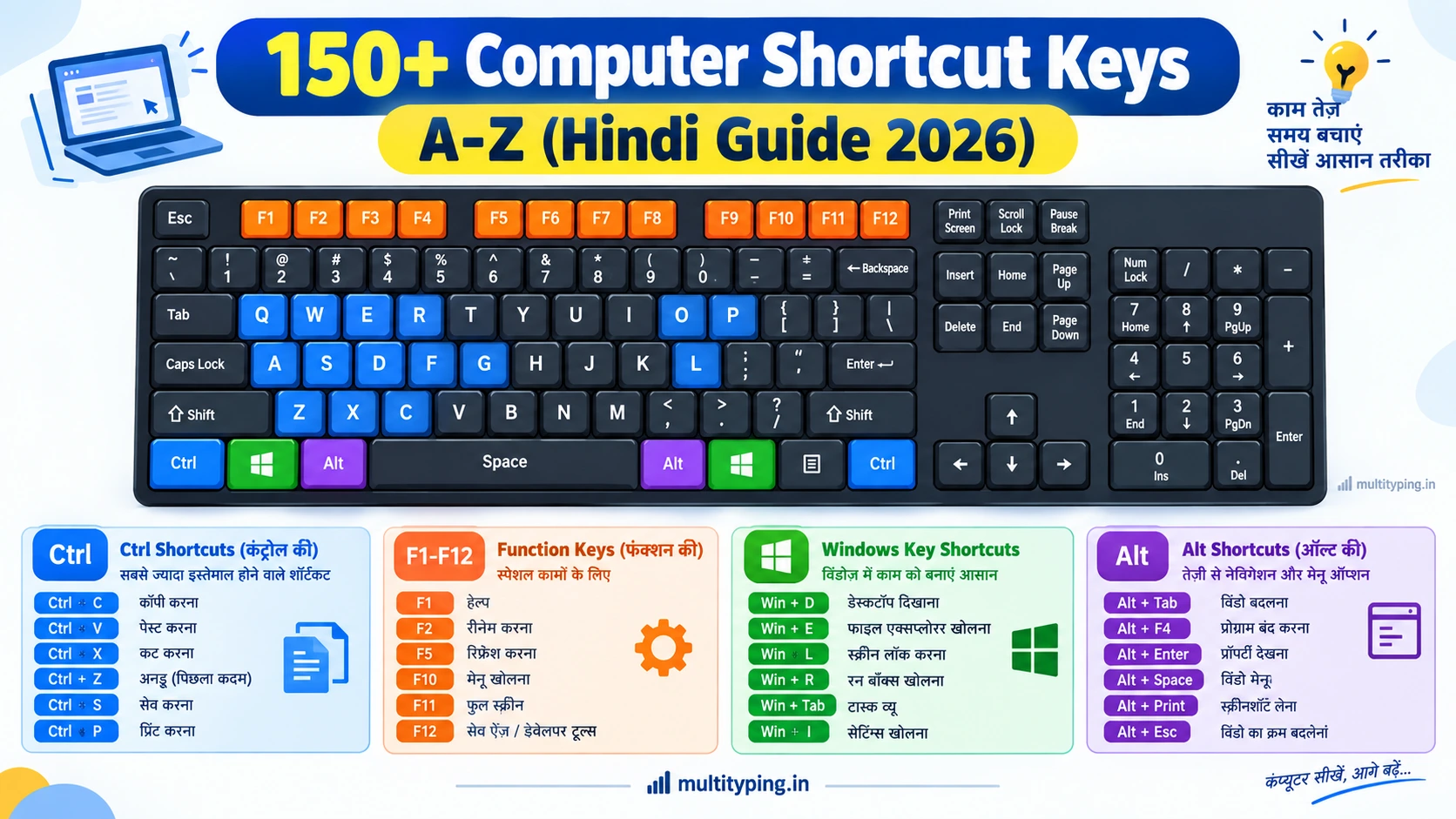
इस Blog में मैं आपको 150+ Computer Shortcut Keys दे रहा हूँ — Tables में, Hindi Explanation के साथ, Memory Tricks के साथ, और Exam-specific Tips के साथ। यह एक ऐसी Complete Guide है जो आपके Computer Knowledge को Permanent बना देगी।

Section 1 — Universal Shortcuts (Ctrl Key) — सबसे ज़रूरी, सब जगह काम करती हैं
यह Shortcuts लगभग हर Application में — Windows, Word, Excel, Browser, Notepad — सब जगह एक जैसी काम करती हैं। इन्हें पहले याद करो क्योंकि यही Most Asked भी हैं।
| Shortcut Key | क्या करती है? | Memory Trick |
|---|---|---|
| Ctrl + A | सभी Content Select करना (Select All) | A = All |
| Ctrl + C | Selected Content को Copy करना | C = Copy |
| Ctrl + X | Selected Content को Cut करना (Move) | X = कैंची की Shape — काटना ✂️ |
| Ctrl + V | Copied/Cut Content को Paste करना | V नीचे की तरफ Point करता है — यहाँ डालो |
| Ctrl + Z | पिछला काम Undo करना (गलती वापस लेना) | Z = Zig-zag पीछे जाना |
| Ctrl + Y | Undo किया हुआ Redo करना | Y = Yes, phir karo |
| Ctrl + S | File/Document Save करना | S = Save |
| Ctrl + P | Document Print करना / Print Preview | P = Print |
| Ctrl + F | Find/Search Box खोलना | F = Find |
| Ctrl + H | Find & Replace Box खोलना | H = Hatao aur badlo |
| Ctrl + N | New File / New Document / New Window | N = New |
| Ctrl + O | Saved File Open करना | O = Open |
| Ctrl + W | Current Window / Tab बंद करना | W = Widow (बंद करना) |
| Ctrl + T | Browser में नया Tab खोलना | T = Tab |
| Ctrl + Shift + T | Browser में बंद हुआ Tab वापस खोलना | Shift = Reverse करना |
| Ctrl + + | Screen / Text Zoom In करना | + = बड़ा करना |
| Ctrl + − | Screen / Text Zoom Out करना | - = छोटा करना |
| Ctrl + 0 | Zoom को Default (100%) पर Reset करना | 0 = Zero = Default |
| Delete | File को Recycle Bin में भेजना | Temporary Delete |
| Shift + Delete | File को Permanently Delete करना (Recycle Bin नहीं जाती) ⭐ Exam Favorite! | Shift = Extra Power = Permanent |
Section 2 — Function Keys (F1 से F12) — Exams में सबसे ज़्यादा पूछी जाती हैं
Function Keys को ज़्यादातर Candidates Ignore करते हैं — और यही उनकी सबसे बड़ी गलती होती है। SSC और Bank Exams में F1-F12 Keys से Regular Questions पूछे जाते हैं। इन्हें एक बार ठीक से समझ लो।
| Key | Primary Function | Special Use (Word / Excel / Browser) |
|---|---|---|
| F1 | Help Menu खोलना — किसी भी Software में | Word: Help Window | Excel: Help | Browser: Help |
| F2 | File या Folder का नाम Rename करना | Excel: Active Cell Edit Mode में जाना |
| F3 | Search/Find Box खोलना (Explorer/Browser) | Word: AutoText Paste करना |
| F4 | पिछली Action Repeat करना | Alt + F4: Active Window बंद करना ⭐ Exam Favorite! |
| F5 | Page/Screen Refresh करना | Word: Go To Dialog खोलना | PPT: Slideshow शुरू करना ⭐ |
| F6 | Browser में Address Bar को Highlight करना | Open Panels के बीच Switch करना |
| F7 | Spelling & Grammar Check करना | Word/Excel: Spell Check ⭐ Exam Favorite! |
| F8 | Safe Mode में Boot करने का Option | Startup के दौरान F8 दबाने पर Safe Mode |
| F9 | Excel में Formulas Recalculate करना | Word: Fields Update करना |
| F10 | Menu Bar Activate करना | Shift + F10: Right-Click Menu खोलना ⭐ |
| F11 | Full Screen Mode Toggle करना | Browser: Full Screen | Excel: New Chart बनाना |
| F12 | Save As Dialog Box खोलना ⭐ Exam Favorite! | Word/Excel: Save As — नए नाम से Save करना |
⭐ Exam Tip: F5 (Refresh / PPT Slideshow), F7 (Spell Check), F12 (Save As), और Alt + F4 (Close Window) — यह चार Keys सबसे ज़्यादा Government Exams में पूछी जाती हैं। इन्हें पहले पक्का करो।
Section 3 — Windows Key Shortcuts — जो बहुत कम लोग जानते हैं
Keyboard पर Windows Logo वाली Key को Win Key कहते हैं। इस Key के Combinations से पूरे System को Control किया जा सकता है — बिना Mouse के। यह एक Power User की पहचान है।
| Shortcut Key | क्या करती है? |
|---|---|
| Win | Start Menu खोलना / बंद करना |
| Win + D | Desktop Show/Hide करना (सब Windows Minimize) ⭐ |
| Win + E | File Explorer (My Computer) खोलना |
| Win + L | Computer Lock करना ⭐ Exam Favorite! |
| Win + R | Run Dialog Box खोलना (Command Run करना) |
| Win + I | Windows Settings खोलना |
| Win + S | Search Bar खोलना |
| Win + PrtScr | Screenshot लेना और Auto-Save करना |
| Win + X | Quick Link Menu खोलना (Device Manager, Task Manager आदि) |
| Win + Tab | Task View खोलना — सभी Open Windows एक साथ देखना |
| Win + ← / → | Window को Left/Right Side पर Snap करना (Split Screen) |
| Win + ↑ | Window को Maximize करना |
| Win + V | Clipboard History खोलना (पहले Copy किए सब Items) |
| Win + . (Period) | Emoji Panel खोलना 😊 |
| Ctrl + Shift + Esc | Task Manager सीधे खोलना ⭐ |
Section 4 — MS Word Shortcuts — Government Exam में सबसे ज़्यादा Important
MS Word भारत में सबसे ज़्यादा Use होने वाला Office Application है। और Government Exams — SSC, Bank, Railway — में MS Word से Related Questions बहुत Common हैं। इन Shortcuts को थोड़ा Extra Time दो।
Formatting Shortcuts (सबसे ज़्यादा Exam में आती हैं):
| Shortcut Key | MS Word में क्या करती है? |
|---|---|
| Ctrl + B | Text Bold करना — B = Bold ⭐ |
| Ctrl + I | Text Italic करना — I = Italic ⭐ |
| Ctrl + U | Text Underline करना — U = Underline ⭐ |
| Ctrl + E | Text Center Align करना |
| Ctrl + L | Text Left Align करना (Default) |
| Ctrl + R | Text Right Align करना |
| Ctrl + J | Text Justify Align करना |
| Ctrl + 1 / 2 / 5 | Line Spacing: 1=Single, 2=Double, 5=1.5 lines ⭐ Exam Favorite! |
| Ctrl + D | Font Dialog Box खोलना (Font, Size, Style बदलने के लिए) |
| Ctrl + Shift + C | Formatting Copy करना (Format Painter) |
| Ctrl + Shift + V | Copied Formatting Paste करना |
| Ctrl + Shift + + (Plus) | Superscript करना (जैसे x²) |
| Ctrl + = (Equal) | Subscript करना (जैसे H₂O) |
| Ctrl + ] (Right Bracket) | Font Size 1 Point बढ़ाना |
| Ctrl + [ (Left Bracket) | Font Size 1 Point घटाना |
| Ctrl + Space | Text की सारी Formatting हटाना (Plain Text बनाना) |
| Ctrl + Enter | New Page (Page Break) Insert करना |
| Ctrl + Home | Document के एकदम शुरू में जाना |
| Ctrl + End | Document के एकदम अंत में जाना |
Section 5 — MS Excel Shortcuts — DEO और Data Entry Jobs के लिए ज़रूरी
MS Excel की Shortcuts Data Entry Operator, Bank Clerk, और Accountant जैसे Posts के लिए बहुत ज़रूरी हैं। Punjab & Haryana HC की तरह कई Posts में Excel Skill Test भी होती है।
| Shortcut Key | Excel में क्या करती है? |
|---|---|
| Ctrl + Home | Cell A1 पर जाना (Spreadsheet की शुरुआत) |
| Ctrl + End | Last Used Cell पर जाना |
| Alt + Enter | Same Cell में नई Line शुरू करना ⭐ |
| Alt + = | AutoSum Formula (SUM) Automatically Apply करना ⭐ |
| Ctrl + Shift + L | Filter Toggle करना (Data Filter On/Off) |
| Ctrl + 1 | Format Cells Dialog Box खोलना |
| F2 | Cell को Edit Mode में खोलना |
| Shift + F3 | Function/Formula Insert करने का Dialog खोलना |
| Ctrl + Shift + 4 ($) | Currency Format Apply करना |
| Ctrl + Shift + 5 (%) | Percentage Format Apply करना |
| F9 | सभी Formulas Recalculate करना |
| Ctrl + F1 | Ribbon Show/Hide करना |
Section 6 — Alt Key Shortcuts — यह भी Exams में पूछी जाती हैं
| Shortcut Key | क्या करती है? |
|---|---|
| Alt + F4 | Active Window / Application बंद करना ⭐ MOST ASKED IN EXAMS |
| Alt + Tab | Open Programs के बीच Switch करना ⭐ |
| Alt + F10 | Menu Bar Activate करना (Excel) |
| Alt + Enter | Selected File/Folder की Properties खोलना |
| Ctrl + Alt + Delete | Security Options Menu (Task Manager, Lock, Shutdown) ⭐ |
| Alt + Prt Sc | सिर्फ Active Window का Screenshot लेना |
| Alt + Backspace | Undo करना (Ctrl + Z जैसा) |
Section 7 — Browser Shortcuts — Chrome और Edge में काम करती हैं
Online Exams, Government Portals, और Daily Work के लिए Browser Shortcuts बहुत Useful हैं।
| Shortcut | Browser में क्या करती है? |
|---|---|
| Ctrl + T | नया Tab खोलना |
| Ctrl + W | Current Tab बंद करना |
| Ctrl + Shift + T | बंद किया हुआ Tab वापस खोलना ⭐ |
| Ctrl + Tab | Tabs के बीच आगे Switch करना |
| Ctrl + L | Address Bar Highlight करना (URL Type करने के लिए) |
| Ctrl + R / F5 | Page Refresh करना |
| Ctrl + H | Browsing History देखना |
| Ctrl + Shift + N | Incognito / Private Mode में नई Window खोलना |
| F11 | Full Screen Mode Toggle करना |
| Alt + ← (Left Arrow) | Previous Page पर जाना (Browser Back Button) |
Government Exam में सबसे ज़्यादा पूछे जाने वाले Shortcuts — Quick Revision List
अगर आपके पास ज़्यादा Time नहीं है और Exam Close है — तो यह 25 Shortcuts पहले याद करो। यह सबसे ज़्यादा बार SSC, Bank, और Railway Exams में पूछी गई हैं।
Shortcuts और Typing Speed का Connection — Typists के लिए Special Section
अगर आप Government Exam की Typing Test की तैयारी कर रहे हैं — तो Shortcuts आपके लिए Double Useful हैं। पहले कारण तो हम ऊपर देख चुके हैं — Computer Awareness में Direct Questions। लेकिन दूसरा कारण और भी Important है।
Shortcuts Typing Speed को Real-World में कैसे बढ़ाती हैं: जब आप Office में काम करते हैं — Document Type करते हो, Formatting करते हो, Save करते हो — यह सब Mouse से करने में Extra Time लगता है। Shortcuts Use करने पर हाथ Keyboard पर रहते हैं — Flow Interrupt नहीं होती। और जब Flow Interrupt नहीं होती तो Typing Rhythm बना रहता है।
एक Study के अनुसार — Keyboard Shortcuts Use करने वाले Workers, Mouse-Dependent Workers से 38 Minutes Extra Productive Time रोज़ पाते हैं — सिर्फ Mouse को हाथ न उठाने से। एक साल में यह 100+ Hours बनता है।
इसीलिए — Typing Practice के साथ Shortcut Keys भी सीखना ज़रूरी है। multityping.in पर Typing Practice करते समय Backspace की जगह Flow Maintain करो, गलती हो तो आगे बढ़ो — यही Shortcut-Mind बनाता है।
Shortcuts याद करने के 5 Smart तरीके
बहुत सारी Shortcuts एक साथ याद करना Overwhelming लग सकता है। यह 5 Methods Use करो — याद करना आसान हो जाएगा।
- Groups में याद करो: सब एक साथ मत पढ़ो। आज सिर्फ Ctrl Shortcuts, कल Function Keys, परसों Windows Key। Small Groups में याद करना Fast और Permanent होता है।
- Memory Tricks Use करो: Ctrl + B = B for Bold, Ctrl + I = I for Italic, Ctrl + C = C for Copy — हर Key का एक Association बनाओ। यह Blog में ऊपर हर Shortcut के साथ दिया है।
- Daily Use में Apply करो: जो Shortcuts सीखी हैं — उन्हें अगले 24 घंटे Deliberately Use करो। जब तक Memory Automates नहीं होती तब तक Conscious Practice ज़रूरी है।
- Sticky Notes Method: अपने Computer Screen के Side पर 5-10 Shortcuts की Sticky Note लगाओ। काम करते हुए बार-बार दिखेंगी — Automatically याद होती जाएंगी।
- Mock Test दो: Exam से पहले Computer Awareness के Mock Tests दो — Shortcut Questions से Related Practice होगी।
Frequently Asked Questions (FAQs)
Q1. Ctrl + Alt + Delete और Ctrl + Shift + Esc में क्या फर्क है?
Ctrl + Alt + Delete एक Security Screen खोलता है जिसमें Lock, Sign Out, Task Manager, Password Change जैसे Options होते हैं। Ctrl + Shift + Esc सीधे Task Manager खोलता है — बिना किसी Extra Screen के। Exam में यह Difference ज़रूर पूछा जाता है।
Q2. F12 और Ctrl + S में क्या अंतर है?
Ctrl + S File को उसी नाम से उसी Location पर Save करता है। F12 Save As Dialog Box खोलता है — जहाँ आप File का नया नाम दे सकते हो, नई Location Choose कर सकते हो, और File Format (जैसे .docx से .pdf) भी बदल सकते हो। यह Difference SSC Computer Awareness में बहुत Important है।
Q3. Delete और Shift + Delete में क्या फर्क है?
Delete File को Recycle Bin में भेजता है — जहाँ से बाद में Restore किया जा सकता है। Shift + Delete File को Permanently Delete करता है — Recycle Bin नहीं जाती, सीधे Remove हो जाती है। यह SSC, Railway, Bank — सभी Exams में बहुत पूछा जाता है।
Q4. कितने Shortcuts याद करना ज़रूरी है Government Exam के लिए?
SSC और Railway Exams में एक Paper में 2-3 Shortcut Questions होते हैं। लेकिन IBPS और Bank Exams में Computer Awareness Section होता है जहाँ 5-10 Questions Shortcuts से आ सकते हैं। ऊपर दी गई 25 Most Important Shortcuts की List Priority है। उन्हें पहले पक्का करो। बाकी इस पूरे Blog से।
Q5. क्या Laptop और Desktop पर Shortcuts Same होती हैं?
हाँ — 95% Shortcuts Laptop और Desktop पर Same काम करती हैं। कुछ Laptops पर Function Keys (F1-F12) Use करने के लिए Fn Key साथ में Press करनी पड़ती है — यह हर Laptop के हिसाब से अलग होता है। External Keyboard (जैसे Government Exam में होता है) पर F Keys बिना Fn के काम करती हैं।
निष्कर्ष — Shortcuts सीखो, Computer Master बनो
दोस्तों, Computer Shortcut Keys — यह सिर्फ एक Skill नहीं हैं। यह आपके Computer Use को Fundamentally Better बना देती हैं। Government Exam में Computer Awareness के Marks, Daily Office Work की Speed, और एक Professional Computer User की Identity — यह सब Shortcuts से आती है।
इस Blog को Bookmark करो — जब भी कोई Shortcut भूलो, यहाँ आकर देखो। और अगर आप Government Exam की Typing Practice कर रहे हो — multityping.in पर आओ। Typing Speed + Computer Knowledge दोनों — यही Combination Government Job दिलाता है।
मैं, अमित कुमार, आपकी तैयारी में हमेशा साथ हूँ। शुभकामनाएँ! 💪⌨️🎯
⌨️ Typing Practice के साथ Computer Knowledge भी बढ़ाएं:
🔗 Free Typing Test → multityping.in/test
🔗 Computer MCQ Practice → multityping.in/mcq