Laptop vs Desktop Typing - यह Confusion क्यों होता है?
दोस्तों, मैं अमित कुमार हूँ और आज मैं आपसे बात करूँगा एक बहुत practical और common question पर जो हर typing learner के मन में आता है - Typing सीखने और practice करने के लिए laptop बेहतर है या desktop? यह सवाल मुझसे लगभग हर दिन कोई न कोई student पूछता है। और honestly, यह बहुत valid question है क्योंकि जिस device पर आप practice करते हैं, वो directly आपकी typing skill development को affect करता है। मैं आपको अपने 10+ years के experience और thousands of students को train करने के बाद एक बिल्कुल honest और practical comparison दूंगा।
पहले समझते हैं कि यह question इतना important क्यों है। जब आप typing सीख रहे होते हैं, तो आपकी fingers को एक specific keyboard feel की आदत पड़ती है। अगर आप laptop keyboard पर सीखते हैं और फिर suddenly exam hall में desktop keyboard मिलता है (जैसा कि ज्यादातर government exams में होता है), तो आपको uncomfortable feel होता है। Keys की height अलग है, spacing अलग है, feedback अलग है। यह discomfort आपकी speed और accuracy को seriously affect कर सकता है। मैंने personally ऐसे candidates देखे हैं जिनकी practice speed 40 WPM थी laptop पर, लेकिन exam hall के desktop keyboard पर सिर्फ 28-30 WPM ही type कर पाए। यह बहुत frustrating है और selection miss होने का कारण बन सकता है।
इस comprehensive guide में मैं आपको बताऊंगा - laptop और desktop keyboards में fundamental differences क्या हैं, typing speed और accuracy पर इनका क्या effect होता है, government exams के perspective से कौन सा बेहतर है, किस situation में कौन सा choose करना चाहिए, और most importantly - अगर आपके पास सिर्फ laptop है तो क्या करें। मैं वो सारी practical insights share करूंगा जो books या websites में नहीं मिलतीं - real-world experience based guidance। तो चलिए शुरू करते हैं यह detailed comparison!
Laptop vs Desktop Keyboard - Typing Practice के लिए Key Differences
Laptop Keyboard - Advantages और Disadvantages
Laptop Keyboard की Construction और Feel
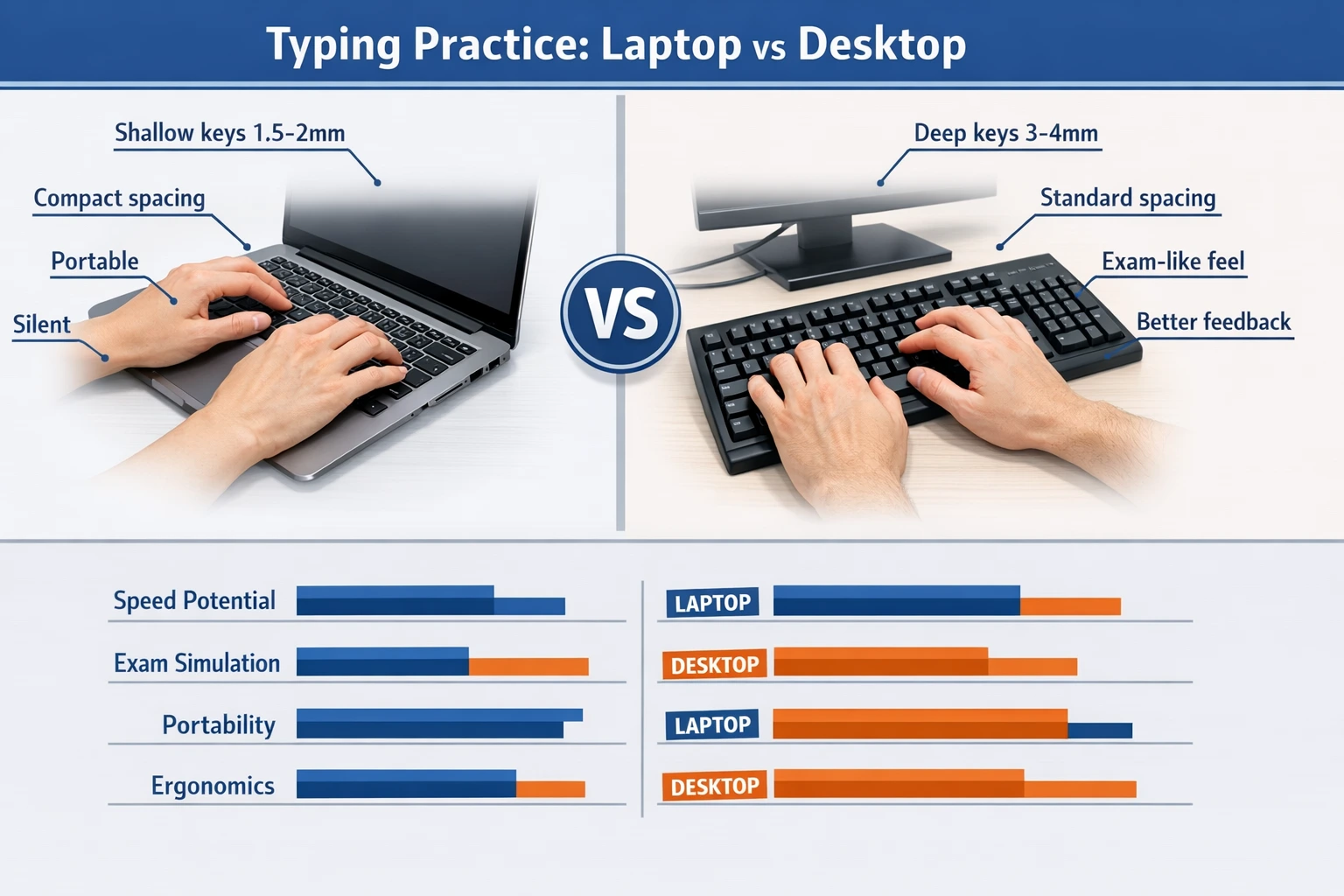
Laptop keyboards को compact और portable बनाने के लिए design किया जाता है। इसलिए इनमें कुछ specific characteristics होती हैं जो desktop keyboards से बिल्कुल अलग हैं। Key Travel Distance: Laptop keys में travel distance बहुत कम होता है - generally 1.5mm to 2mm। Travel distance मतलब जब आप key press करते हैं तो वो कितना नीचे जाती है। कम travel distance का मतलब है कि keys को press करने के लिए बहुत हल्का touch काफी है। यह initially comfortable लगता है क्योंकि fingers को ज्यादा effort नहीं लगानी पड़ती। Key Size और Spacing: Laptop keyboards में keys थोड़ी छोटी होती हैं और spacing भी tight होती है space save करने के लिए। आमतौर पर key size 13-15mm होती है जबकि desktop में 18-19mm। यह difference small लगता है लेकिन typing experience में बहुत fark पड़ता है।
Tactile Feedback: Laptop keyboards में tactile feedback (वो feel जब key press होती है) बहुत minimal होता है। Keys silently press होती हैं, कोई prominent click sound नहीं होता। यह quiet typing के लिए अच्छा है लेकिन feedback की कमी से आपको पता नहीं चलता कि key properly register हुई या नहीं। Key Stability: Laptop keys generally scissor-switch mechanism use करती हैं जो stable होती हैं लेकिन limited durability की होती हैं। Long-term heavy typing में ये keys थोड़ा loose feel करने लगती हैं। Numeric Keypad: छोटे laptops (14-inch या smaller) में numeric keypad नहीं होता। यह एक बड़ा disadvantage है अगर आप numeric data entry practice कर रहे हैं। बड़े laptops (15.6-inch या bigger) में numeric pad होता है लेकिन वो भी compact होता है।
Laptop Keyboard पर Typing - Pros
Portability: यह सबसे बड़ा advantage है। आप अपना laptop कहीं भी ले जा सकते हैं - library, cafe, park, train में travel करते समय। Typing practice के लिए fixed location की constraint नहीं है। यह flexibility बहुत valuable है especially students के लिए जो हमेशा move करते रहते हैं। Space Saving: Small living spaces में जहां separate desk और monitor रखने की जगह नहीं है, laptop ideal है। Bed पर बैठकर भी practice कर सकते हैं (हालांकि यह posture के लिए अच्छा नहीं है लेकिन possible है)। Integrated Setup: Laptop में सब कुछ built-in है - screen, keyboard, trackpad। कोई wires नहीं, कोई external peripherals नहीं। Setup और breakdown instant है। Battery Backup: बिजली की problem वाले areas में laptop की battery backup बहुत useful है। Power cut होने पर भी practice जारी रख सकते हैं।
Modern और Comfortable Feel: Laptop keyboards modern और sleek design की होती हैं। Flat profile होने से कुछ लोगों को comfortable लगता है। Wrist strain कम लगती है initially (हालांकि long sessions में यह issue बन सकता है)। Quiet Typing: अगर आप ऐसी जगह रहते हैं जहां noise issue है (hostel, shared room, library), तो laptop keyboard की silent typing बहुत helpful है। कोई disturb नहीं होता। Uniform Experience: आप जहां भी जाएं, आपका laptop same keyboard provide करता है। यह consistency अच्छी है familiarity के लिए। आपको बार-बार different keyboards के साथ adjust नहीं करना पड़ता practice sessions में।
Laptop Keyboard पर Typing - Cons
Shallow Key Travel - Speed Limitation: यह सबसे बड़ा disadvantage है। Shallow key travel की वजह से fast typing में fingers को proper feedback नहीं मिलता। आप सोचते हैं key press हो गई लेकिन actually register नहीं हुई - result में missed characters। या फिर accidentally double press हो जाता है। यह speed को limit करता है - generally laptop keyboards पर 40-45 WPM के बाद plateau आ जाती है। Exam Hall Mismatch: यह critical point है। लगभग सभी government exam centers - SSC, Railway, Banking, State PSC - में desktop keyboards होते हैं। अगर आपने सिर्फ laptop पर practice की है, तो exam day पर desktop keyboard बहुत अलग feel करेगा। Keys deeper हैं, firmer हैं, spacing different है। यह sudden change आपकी performance को seriously hamper कर सकता है। मैंने इसे बार-बार देखा है - students जो laptop masters हैं, exam में struggle करते हैं।
Ergonomics Issues: Laptop की screen और keyboard fixed होते हैं। सही typing posture के लिए screen eye level पर और keyboard थोड़ा नीचे होना चाहिए। लेकिन laptop में दोनों same level पर हैं। इससे या तो neck को नीचे झुकाना पड़ता है (screen देखने के लिए) या wrists को uncomfortably ऊपर उठाना पड़ता है। Long typing sessions में यह neck pain, shoulder tension, और wrist strain cause करता है। Durability Concerns: Laptop keyboards heavy typing के लिए design नहीं होते। अगर आप रोजाना 2-3 hours intensive typing practice करते हैं, तो laptop keys jaldi wear out हो सकती हैं। Keys sticky होना, response slow होना - ये issues आ सकते हैं। और laptop keyboard replace करना expensive होता है। Limited Customization: Laptop keyboard के साथ आपको वही मिलता है जो built-in है। अगर वो comfortable नहीं है, तो कोई option नहीं है change करने का (external keyboard connect करें तो अलग बात है लेकिन फिर laptop keyboard का फायदा ही क्या रहा)।
Desktop Keyboard - Advantages और Disadvantages
Desktop Keyboard की Construction और Types
Desktop keyboards में variety बहुत है - membrane keyboards, mechanical keyboards, ergonomic keyboards। लेकिन generally जो standard office keyboards होती हैं (जो exam centers में भी मिलती हैं), उनकी कुछ common characteristics हैं। Full Key Travel: Desktop keyboards में key travel 3-4mm होता है - यानी laptop से लगभग double। इस deeper travel से proper tactile feedback मिलता है। आपको physically feel होता है कि key press हो गई। यह accuracy improve करता है। Standard Key Size: Desktop keys larger होती हैं - 18-19mm। इससे targeting easier होती है। Accidental adjacent key presses कम होते हैं। Keys के बीच spacing भी ज्यादा होती है जो comfortable typing में help करती है।
Better Tactile Feedback: Desktop keyboards (especially membrane ones जो exam centers में common हैं) में keys press करने पर एक definite 'click' feel होता है। यह feedback आपके brain को signal देता है कि keystroke successful था। इससे confidence बढ़ता है और typing rhythm improve होता है। Sturdy Build: Desktop keyboards generally heavy-duty होती हैं। Plastic thicker होता है, keys firmly mounted होती हैं। इन्हें heavy usage के लिए design किया जाता है। Years of intensive typing भी handle कर सकती हैं without degradation। Full Numeric Keypad: लगभग सभी desktop keyboards में right side पर full-size numeric keypad होता है। यह numeric typing practice के लिए essential है। Banking और data entry exams में यह बहुत important है।
Desktop Keyboard पर Typing - Pros
Exam Simulation - सबसे बड़ा Advantage: यह most critical point है। अगर आप desktop keyboard पर practice करते हैं, तो exam hall का keyboard बिल्कुल similar feel करेगा। कोई surprise नहीं होगा, कोई adjustment period नहीं होगा। आप confidently type कर पाएंगे। यह psychological advantage भी है - 'मैंने इसी तरह के keyboard पर practice की है, मैं comfortable हूँ'। यह confidence performance में directly reflect होता है। Higher Speed Potential: Desktop keyboards पर experienced typists 50-60+ WPM easily achieve कर सकते हैं। Proper feedback और key travel fast typing को support करते हैं। Professional typists और stenographers desktop keyboards ही prefer करते हैं इसीलिए।
Better Ergonomics (with proper setup): Desktop keyboard को separately position किया जा सकता है। Monitor को eye level पर रखें, keyboard को comfortable height पर। Wrists को neutral position में रख सकते हैं। यह proper ergonomic setup long-term health के लिए बहुत important है। Durability और Longevity: एक अच्छी quality desktop keyboard (₹500-1000 में भी मिल जाती है) years तक चल सकती है heavy typing के बाद भी। Keys worn out नहीं होतीं, response consistent रहता है। यह long-term investment के रूप में economical है। Touch Typing Development: Desktop keyboard की defined keys और proper feedback touch typing technique सीखने में बहुत help करती हैं। Fingers को proper positioning की training मिलती है।
Variety और Affordability: Desktop keyboards बहुत affordable हैं। ₹300-500 में decent quality membrane keyboard मिल जाती है जो practice के लिए पूरी तरह sufficient है। अगर budget है तो ₹1000-3000 में mechanical keyboards भी available हैं जो premium experience देती हैं। आप अपनी preference और budget के according choose कर सकते हैं। Easy Replacement: अगर keyboard खराब हो जाए या comfortable नहीं लगे, तो easily replace कर सकते हैं। कोई expensive repair या service center नहीं - बस नया keyboard plug in करो और start करो। Dedicated Practice Setup: Desktop keyboard के साथ आप एक proper practice station बना सकते हैं। Desk पर fixed setup, chair की proper height, monitor का angle - सब optimize करें। यह professional environment आपकी practice की quality को improve करता है।
Desktop Keyboard पर Typing - Cons
Lack of Portability: यह obvious disadvantage है। Desktop keyboard को हर जगह नहीं ले जा सकते। आपको fixed location पर ही practice करनी होगी। अगर आप travel करते हैं या hostel में different places shift करते रहते हैं, तो यह inconvenient हो सकता है। Space Requirement: Desktop keyboard के साथ एक proper desk चाहिए, एक monitor या laptop (external screen के लिए), mouse, और सब kuch systematically arrange करना होता है। Small rooms या shared spaces में यह challenging हो सकता है। Initial Cost (अगर laptop already है): अगर आपके पास पहले से laptop है, तो अलग से desktop keyboard खरीदना एक additional expense है। हालांकि ये expensive नहीं होते (₹300-1000), लेकिन budget-conscious students के लिए यह एक consideration है।
Noise Level: Desktop keyboards (especially membrane ones) laptop से ज्यादा noisy होती हैं। Keys press करने पर audible click sound होता है। अगर आप quiet environment में practice कर रहे हैं (library, late night जब घर में सब सो रहे हों), तो यह disturbing हो सकता है। Setup Time: हर practice session के लिए सब कुछ connect करना होता है - keyboard, mouse, power on करना। यह laptop की तरह instant नहीं है। हालांकि यह minor inconvenience है, लेकिन कुछ लोगों को irritating लग सकता है। Power Dependency: Desktop setup electricity पर completely dependent है। बिजली गई तो practice रुक जाती है (unless आपके पास inverter या UPS है)। Laptop की तरह battery backup नहीं है।

Typing Practice - Laptop और Desktop Users के लिए Recommendations
Government Exam Perspective - कौन सा Better है?
Exam Center Reality - Desktop Keyboards Dominate
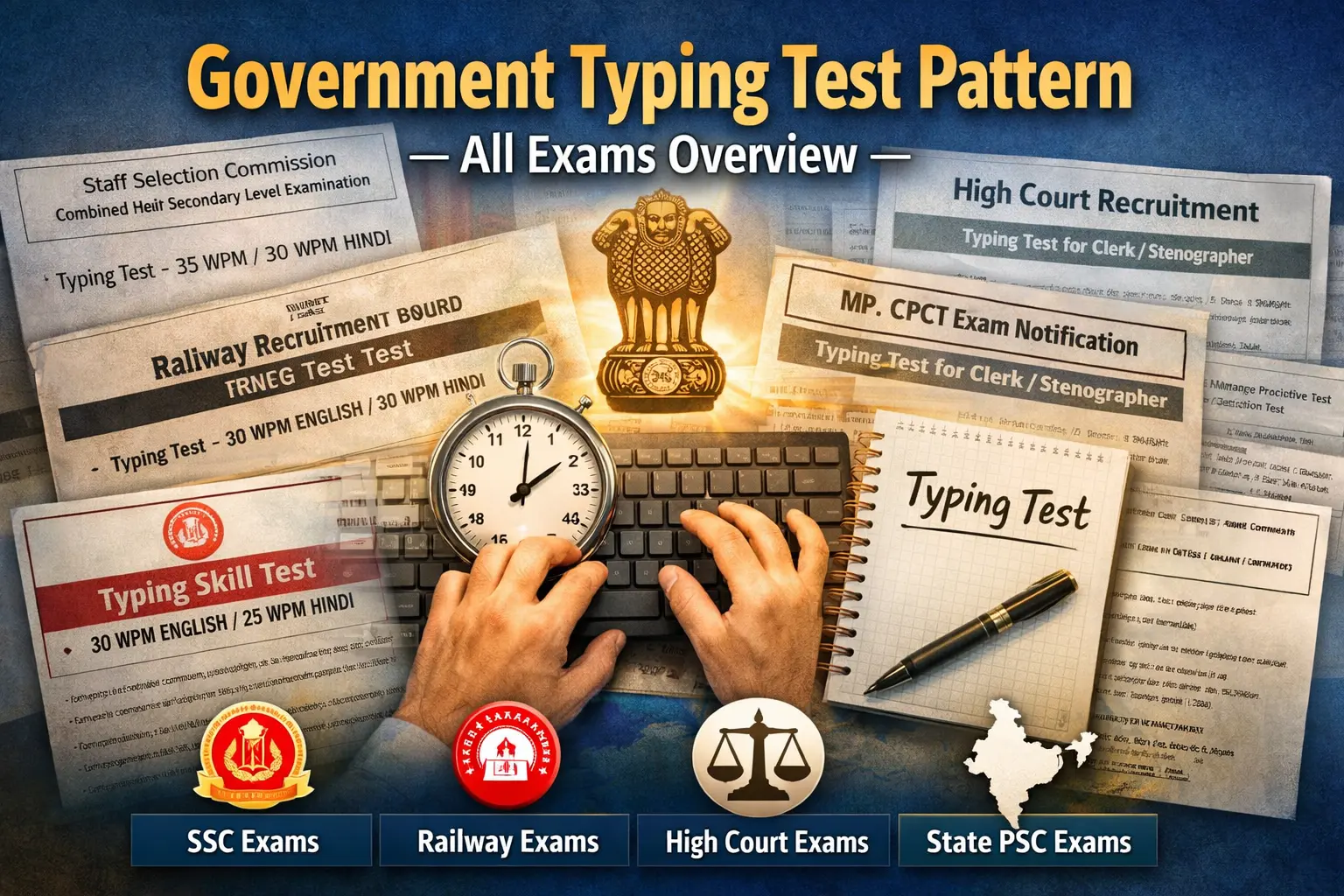
यह एक undeniable fact है - लगभग सभी government typing test centers में desktop keyboards होते हैं। चाहे SSC CGL हो, Railway हो, Banking हो, या State PSC - सब जगह standard desktop membrane keyboards का use होता है। ऐसे cases बहुत rare हैं जहां laptop-style keyboards provide किए जाएं। इसलिए अगर आप government exam की तैयारी कर रहे हैं (जो ज्यादातर typing learners होते हैं), तो desktop keyboard पर practice करना non-negotiable है। यह सिर्फ preference की बात नहीं है - यह practical necessity है। मैंने personally dozens of candidates देखे हैं जिन्होंने laptop पर excellent practice की थी - 42-45 WPM comfortable speed थी। लेकिन exam day पर desktop keyboard ने उन्हें completely throw off कर दिया। Fingers को adjust करने में time लगा, speed drop हो गई 32-35 WPM पर, और कुछ cases में तो fail भी हो गए।
Adaptation Period - एक Real Problem
अगर आप laptop से desktop में switch करते हैं exam के just before, तो एक adaptation period जरूर होगा। यह period vary करता है person to person - कुछ लोगों को 2-3 days लगते हैं, कुछ को एक week या उससे ज्यादा। लेकिन exam preparation में यह adaptation period risky है। आप उस critical time में अपनी practice की momentum नहीं खोना चाहते। इसलिए मेरी strong recommendation है - शुरू से ही desktop keyboard पर practice करें। अगर आपके पास desktop नहीं है, तो एक external desktop keyboard खरीद लें (बहुत सस्ती मिल जाती हैं) और उसे अपने laptop से connect करके use करें। हाँ, portability sacrifice होगी। हाँ, setup थोड़ा cumbersome होगा। लेकिन exam success के लिए यह worthwhile trade-off है। मैंने जो students इस advice को follow किए हैं, उनका success rate significantly higher है compared to laptop-only practicing students।
Best Approach - अलग Situations के लिए Recommendations
Situation 1: आपके पास सिर्फ Laptop है
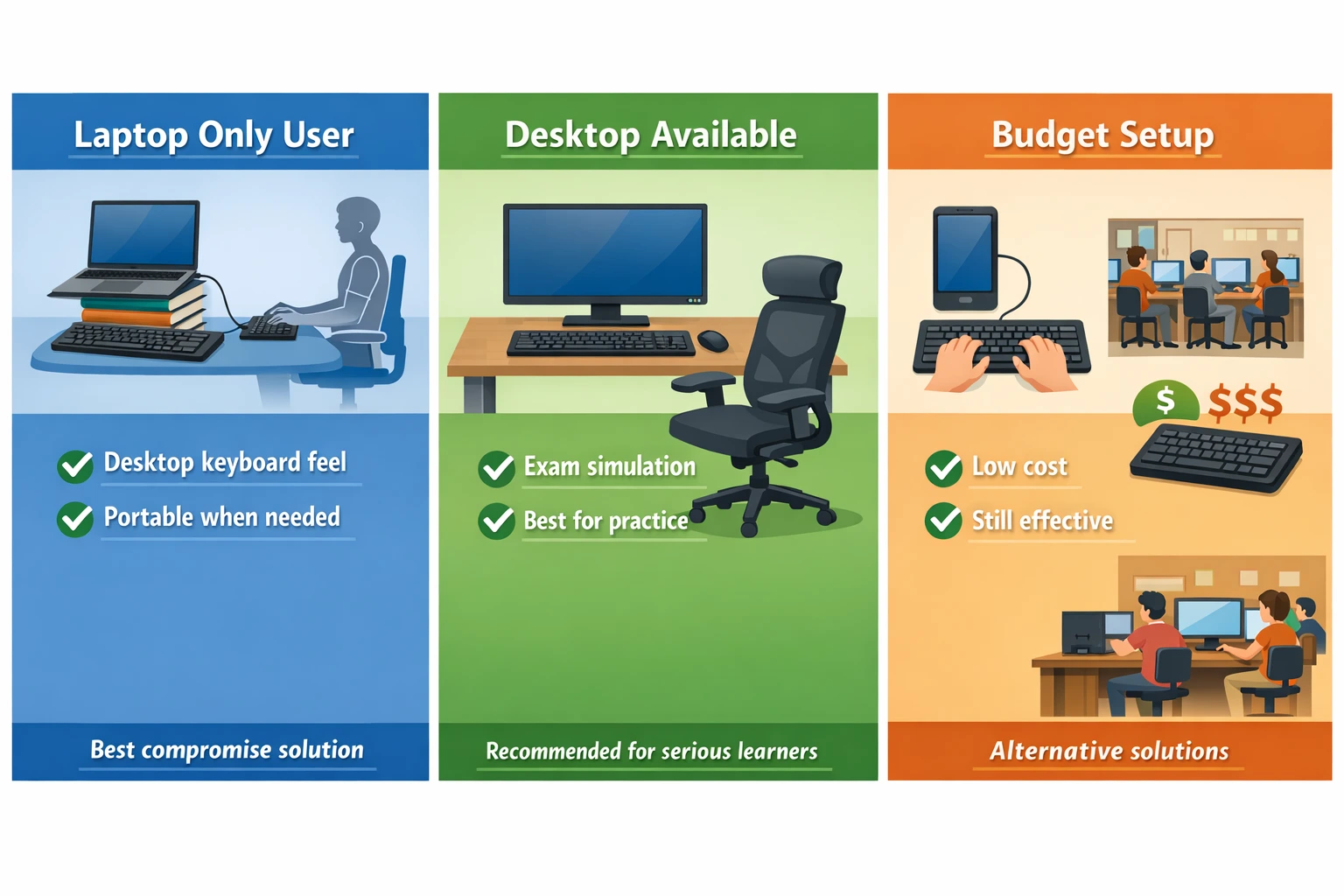
अगर circumstances ऐसी हैं कि आपके पास सिर्फ laptop है और desktop खरीदना possible नहीं है, तो कम से कम एक external desktop keyboard जरूर खरीदें (₹300-500 investment)। इसे अपने laptop से USB port के through connect करें। Laptop screen को थोड़ा elevated position पर रखें (books की stack बनाकर या laptop stand use करके) ताकि screen eye level के करीब आए। External keyboard को comfortable height पर desk पर रखें। यह setup थोड़ा makeshift लगेगा लेकिन यह आपको desktop keyboard की feel देगा जो exam में काम आएगी। Daily practice इसी setup पर करें। Laptop keyboard को ignore करें typing practice के लिए - उसे सिर्फ normal computer work के लिए use करें।
Situation 2: आपके पास Desktop भी Available है
अगर आपके घर में या access में desktop है (cyber cafe, library, friend का desktop), तो majority practice desktop पर ही करें। मेरा suggestion है 80-90% practice desktop keyboard पर, और occasionally (10-20%) laptop पर भी practice करें flexibility के लिए। लेकिन primary focus desktop पर ही रखें। Desktop पर multityping.in पर regular practice करें, timed tests दें, अपनी speed track करें। यह approach आपको best of both worlds देता है - desktop keyboard mastery (exam के लिए) और laptop familiarity (अगर कभी laptop पर काम करना पड़े)।
Situation 3: Budget बहुत Limited है
अगर financial constraints हैं और laptop भी नहीं है, desktop भी नहीं है, तो alternatives explore करें। Cyber cafe या Library: बहुत सी public libraries में free computer access होती है. Cyber cafes में ₹20-30 per hour में practice कर सकते हैं। हफ्ते में 3-4 days, 1-2 hours sessions - यह भी sufficient है अगर focused practice करें। Friends या Relatives: अपने दोस्तों या relatives से पूछें अगर आप उनके desktop पर practice कर सकते हैं। Most people supportive होते हैं especially अगर वे जानें कि आप government exam की तैयारी कर रहे हैं। Second-hand Keyboard: अगर नया keyboard नहीं खरीद सकते, तो OLX, Quikr जैसी sites पर second-hand keyboards ₹100-200 में मिल जाते हैं जो perfectly functional होते हैं। Mobile + OTG keyboard भी एक budget option है।
Practical Tips - दोनों Keyboards के साथ Practice
Transition Strategy अगर Laptop से Desktop जा रहे हैं
अगर आपने पहले laptop पर practice की है और अब desktop पर shift कर रहे हैं, तो यह transition strategy follow करें: Week 1 - Familiarization: Desktop keyboard को feel करें। Keys को slowly press करें, spacing समझें। Touch typing के basic drills करें - home row practice, simple words। Speed की चिंता बिल्कुल मत करें। सिर्फ keys की location और feel को internalize करें। Initially आपकी speed बहुत drop होगी (laptop पर 35 WPM थी तो desktop पर 20-22 आएगी शुरू में) - यह normal है, घबराएं नहीं। Week 2-3 - Building Speed: अब gradually speed बढ़ाना start करें। Daily practice sessions में passages type करें। हर day थोड़ा faster type करने की कोशिश करें लेकिन accuracy compromise मत करें। आप देखेंगे कि week 2 के end तक आप 28-30 WPM पर आ जाएंगे। Week 3 में 32-35 WPM।
Week 4 onwards - Mastery: अब आप comfortable हो चुके होंगे। Desktop keyboard आपको natural लगने लगेगा। अब focus करें speed को और increase करने पर और accuracy को 95%+ maintain करने पर। Timed tests regularly दें। यह transition period में patience रखना बहुत important है। बहुत से लोग जब initial speed drop देखते हैं तो frustrated हो जाते हैं और वापस laptop पर चले जाते हैं। यह गलती है। Temporary discomfort को tolerate करें क्योंकि long-term benefit बहुत बड़ा है। मैंने personally यह transition किया था और पहले week में बहुत frustrating था। लेकिन मैंने persist किया और 3 weeks में मैं पहले से भी better type कर रहा था।
Ergonomics - दोनों Setups के लिए Important
चाहे laptop हो या desktop, proper ergonomics बहुत critical है especially अगर आप daily 1-2 hours typing practice कर रहे हैं। Screen Position: Screen आपकी eye level पर या थोड़ा नीचे होना चाहिए। आपको neck नीचे या ऊपर नहीं करना चाहिए screen देखने के लिए। Laptop में यह difficult है क्योंकि screen और keyboard fixed हैं - इसलिए या तो laptop को elevate करें (और external keyboard use करें) या external monitor use करें। Keyboard Height: Keyboard elbow level पर होना चाहिए। जब आप type करें तो forearms parallel to floor हों। Wrists को bend या strain नहीं करना चाहिए। Chair और Posture: Back straight, feet flat on floor। Slouching या hunching avoid करें। अच्छी chair invest करें अगर possible हो - यह long-term health investment है।
Breaks और Stretches: हर 20-25 minutes typing के बाद 2-3 minutes का break लें। Hands को shake करें, wrists को rotate करें, neck को stretch करें। यह prevents repetitive strain injuries। Eye strain भी issue है - हर 20 minutes में 20 seconds के लिए 20 feet दूर कुछ देखें (20-20-20 rule)। यह eyes को rest देता है। Lighting: Proper lighting बहुत important है। Screen पर glare नहीं होनी चाहिए। Room में adequate ambient light होनी चाहिए। बहुत dark या बहुत bright - दोनों eye strain cause करते हैं। ये ergonomic principles laptop और desktop दोनों के लिए apply होती हैं। Proper posture maintain करना आपकी long-term typing health के लिए उतना ही important है जितना speed और accuracy।
निष्कर्ष - सही Choice करें
दोस्तों, laptop vs desktop keyboard का यह debate ultimately एक practical decision है जो आपकी specific situation, goals, और resources पर depend करता है। लेकिन अगर मुझे एक clear recommendation देनी हो, तो वो यह है: अगर आप government typing exam की तैयारी कर रहे हैं, तो desktop keyboard पर practice करना non-negotiable है। यह सिर्फ एक preference नहीं है - यह exam success के लिए एक necessity है। Exam centers में desktop keyboards ही होते हैं और उस पर comfortable होना आपकी जिम्मेदारी है। अगर आपके पास सिर्फ laptop है, तो कम से कम एक external desktop keyboard (₹300-500) invest करें और उस पर practice करें।
हां, laptop keyboard के अपने advantages हैं - portability, convenience, modern feel। लेकिन ये advantages exam success की तुलना में secondary हैं। एक बार आप government job पा लेते हैं, फिर आप जो चाहे keyboard use कर सकते हैं। लेकिन selection के लिए desktop keyboard mastery जरूरी है। मैंने personally यह journey की है - laptop से desktop में transition, initial struggle, और फिर mastery। और मैंने हजारों students को यही advice दी है जिन्होंने successfully exams clear किए हैं। आपकी typing journey में यह एक crucial decision है। सही choice करें, consistent practice करें, और success जरूर मिलेगी। multityping.in पर regular practice करें चाहे laptop हो या desktop - लेकिन desktop keyboard को priority दें। All the best! 💻⌨️